Why Search Console Clicks Don't Match GA4 (and What to Check First)
Compare Search Console clicks with GA4 Google organic sessions. Check referrers, consent and redirects before changing attribution.
Search Console can record a click even when the destination page never executes its analytics code. Before changing GA4 to close the gap, I would check the Google organic scope and whether the affected landing pages collect data as intended. Unequal totals alone cannot identify a tracking fault.
Google's Search traffic identification guide, updated November 12, 2026, gives that investigation a useful starting point. It explains which referral information Google sends and how that information can disappear. The documented behavior also limits what can be reconstructed from analytics or logs, especially when different Google surfaces share an origin.
TLDR. Compare Search Console clicks with GA4 sessions filtered to Google organic, using matching reporting scope. Check collection on affected landing pages, then redirects and classification rules. Investigate changes in the trends. Requiring equal totals or assigning unknown traffic to Google would make the reports less useful.
Google Search's origin-only Referer
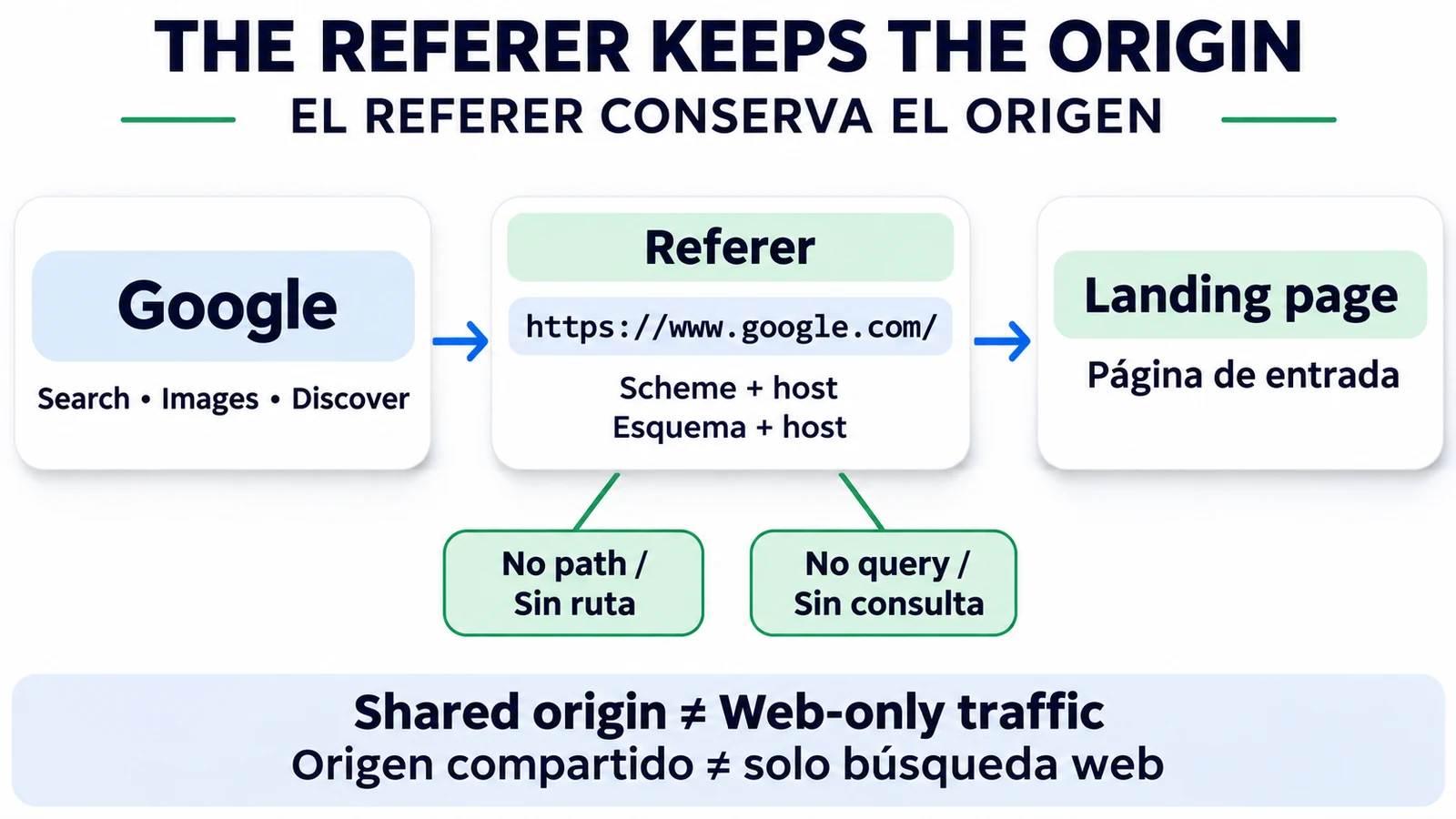
The HTTP header is spelled Referer. Google's documented origin policy includes the scheme and host, without the referring URL's path or query parameters. A value such as https://www.google.com/ contains no search query by design. That absence does not show a loss of attribution. Use Search Console's Performance report for query data.
The documented values depend on the surface:
- Google Search on the web.
https://www.google.com/or a local Google domain, such ashttps://www.google.co.uk/orhttps://www.google.co.jp/. - Google app on Android.
android-app://com.google.android.googlequicksearchbox/https/www.google.comwhen the app opens the link in a browser tab, or a Google web origin. - Google app on iOS.
https://www.google.com/or a local Google domain.
Discover uses the values of the surface where the reader viewed it. Other Google services served from the same origins, including Google Images, can send the same values. A Google-origin match therefore cannot isolate Web Search or establish which Search Console breakdown should contain the visit.
That limit matters before writing a log filter. Matching the documented values can help investigate Google-origin requests, but it cannot recreate a Web-only click total from information the header does not contain.
Blank referrers and unrecorded visits
A browser or operating system may omit the HTTP Referer, or block JavaScript access to document.referrer, for privacy and security reasons. Google lists private browsing and anti-fingerprinting protections, native mobile search widgets opening an external browser, privacy extensions and strict settings. Opening a result in a new tab is another possibility in some browsers. None of those examples means every new tab loses its referrer.
JavaScript analytics has a separate collection dependency. Browser privacy settings, consent management or ad blockers can prevent some visits from being recorded. A blank header and an absent analytics record are different observations. One does not establish the other.
As a diagnostic check, test the intended tracking behavior under the consent choices your implementation supports. Record the choice used in the test and whether the expected collection occurred. The Google guidance does not establish that every declined-consent visit disappears from every GA4 setup.
I would leave the source unresolved when the referrer is blank, rather than assign the visit to Google organic without evidence.
Redirects and attribution checks on your site
Inspect a representative affected landing URL through its redirect chain. A client-side redirect using JavaScript or meta refresh may replace the original referrer with the site's own page URL. A redirect that sends a stricter Referrer-Policy can also remove the header. Check where the information changes instead of assuming the final value was present at the first request.
Query-string preservation deserves a separate check. Redirects can remove parameters, and Google's example is gclid, commonly used for ad tagging. That is a paid-measurement concern, not an organic search query. Its absence on an organic landing URL does not demonstrate a fault.
For Google traffic missing from organic or appearing as referral/direct, Google recommends reviewing custom channel rules, referral exclusions or filters in the analytics configuration. This is general analytics guidance. The practical GA4 task is to inspect the report filters and relevant configuration in use, then change only a demonstrated error.
A rise in Direct or Referral alongside lower reported Google organic sessions is a lead to investigate. It does not prove the same visits moved between those categories. Keep that distinction when extending the check to an AI referral traffic audit.
Clicks, sessions and comparison scope
A Search Console click records selection of a link in Google Search. Conventional client-side analytics collection depends on the destination loading and its tracking code executing. A session is an interaction period, so neither every Search click nor every page load should be treated as a new session.
Google's Search Console and Analytics comparison guide recommends comparing general trends. Its example filters Analytics sessions to Session source = google and Session medium = organic. The entire Organic Search channel can include other engines, while total sessions can include paid traffic. Search Console's organic reporting excludes Google Ads clicks.
Use completed reporting windows and inspect the daily time boundaries. Search Console reporting defaults to Pacific Time, while Analytics uses the property's configured timezone. A difference around midnight can affect a daily comparison without showing a collection failure.
Page-level comparisons also need URL mapping. Search Console can report against Google's selected canonical URL while Analytics records activity on tagged destination URLs. Non-HTML destinations such as PDFs may receive Search clicks without conventional page analytics in the file. Review those destinations separately before treating their clicks as missing GA4 sessions.
If Search Console itself has an unusual increase, inspect the click spike by page and query before interpreting the larger total as a loss in GA4. If both systems show a decline, investigate Search visibility and indexing alongside collection, and use the organic traffic decline diagnosis to check whether the drop is limited to your site or shows up more broadly.
A 15-minute diagnostic checklist
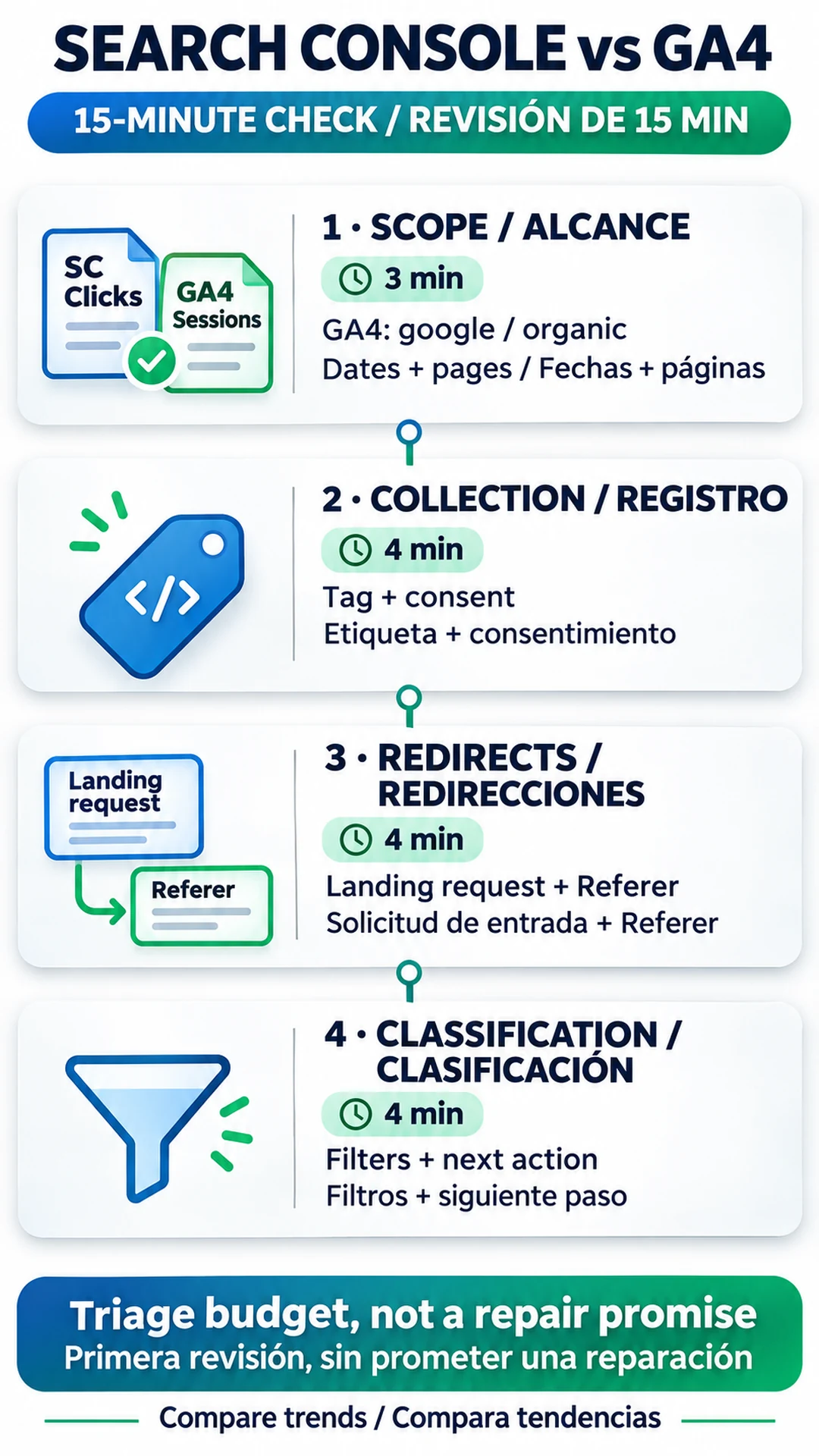
Use this as an initial triage budget. It is a recommendation for ordering checks, not a measured repair time or a promise to finish the diagnosis in 15 minutes.
- 3 minutes for scope. Compare completed dates and GA4 sessions filtered to Google organic. Check the intended Search Console search type and the affected landing pages. Match country and device when those segments help locate the change.
- 4 minutes for collection. Test a representative affected page and a comparison page. Check the intended analytics tag and consent behavior. If the pattern changed after a release, include that release in the implementation review.
- 4 minutes for redirects and logs. Follow the landing URL's redirect chain and inspect its Referer. In logs, examine landing-page requests rather than counting images, CSS and JavaScript as visits. Those resource requests can use your own page as their referrer. Logs provide diagnostic evidence, not an equivalent count of people or Search clicks.
- 4 minutes for classification and the next action. Review report filters and relevant channel configuration. Save the observed fault or unresolved question with its scope. If there is a demonstrated implementation error, correct it and repeat the same comparison.
If the scope explains the difference and the trends remain similar, I would keep the attribution settings and document what the comparison shows. A changed pattern calls for more investigation. Preserve what each check established so the next person can distinguish a documented fault from a source that remains unknown.
Frequently asked questions
Should Search Console clicks equal GA4 sessions?
No. They measure different activity and use different collection systems. Compare aligned trends and investigate changed discrepancies rather than requiring equal totals.
Does a Google Referer contain the search query?
No. Google's documented origin policy omits the referring URL's path and query parameters. Use Search Console's Performance report for query data.
Can the Google referrer identify Discover separately?
No. Discover uses the values of its viewing surface, and other Google services can share those origins. The header alone cannot isolate Discover or Web Search.
Does an increase in Direct prove that organic traffic was lost?
No. It is a reason to inspect collection and attribution. A blank referrer does not identify the original source.
What discrepancy percentage is acceptable?
The two Google guides provide no universal percentage. Use comparable scope and the site's trend history to decide what needs investigation.
About the Author