Was Your WordPress Site Hacked for SEO Spam? How to Check and Clean It Up
Check WordPress SEO spam with Search Console and host-level evidence. Close the entry point, remove injected content and verify Google's follow-up.

If Google shows pages your team never published, save the URLs before trying to make the results disappear. A normal-looking homepage does not settle the question. The WordPress installation may still contain injected content or allow the attacker back in, even after a search result is hidden.
Treat the unexpected result as a reason to investigate the site. Confirm what changed, involve the host when needed, and close the entry point as part of cleanup. Search Console can help identify the problem and handle Google's follow-up, but it cannot replace that security work.
TLDR. Check Security issues and Manual actions separately, investigate unfamiliar indexed URLs, then verify the WordPress files and access with the maintainer. Restore legitimate pages and remove attacker-created pages with genuine 404 or 410 responses. Request the applicable review after tested cleanup. Temporary removal from search, review approval and later indexing are separate outcomes.
The Gootloader example and WordPress SEO spam
Compromised WordPress sites can put visitors at risk as well as damage search visibility. The Netherlands Police release of November 12, 2026 describes search manipulation through infected WordPress sites in the Gootloader action. It reports 14 servers taken down in the Netherlands, plus 218 domains seized and 681 websites disinfected jointly by Dutch police and international partners.
The investigation, led under Dutch prosecution authorities, involved the Netherlands with Germany, Denmark, the UK, the US and Canada, supported by Europol and Eurojust. Europol describes fake legal documents distributed through compromised websites, including WordPress sites, to infect visitors and enable further crimes such as ransomware. Those results belong to the Gootloader action. They do not identify the cause of suspicious content on another site.
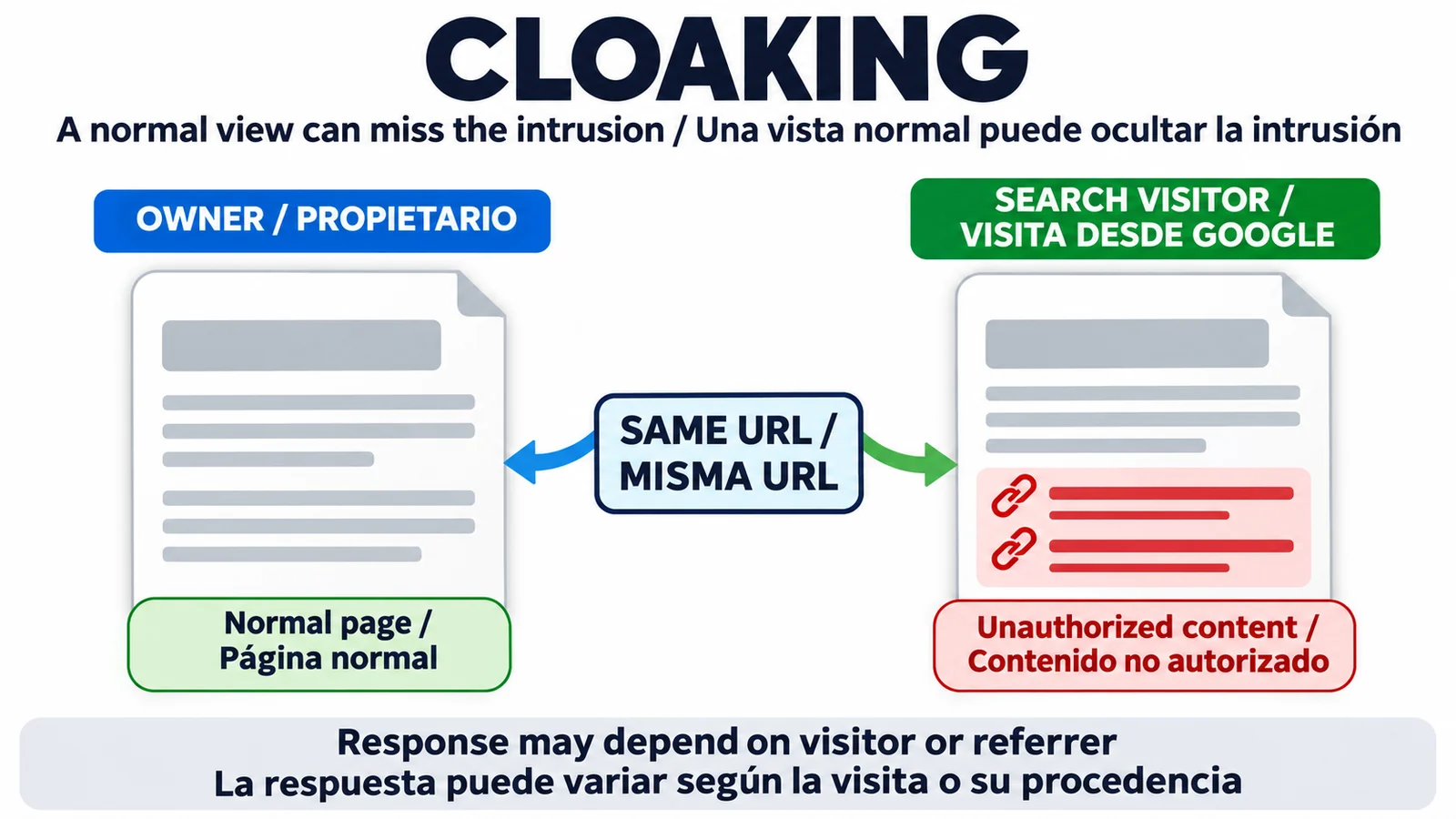
SEO spam can involve unauthorized pages, links inserted into existing content or malicious redirects. Google's spam policies describe hacked content and cloaking, including content presented differently to search engines and users. The owner's direct visit may therefore differ from a search visitor's request. Do not use the appearance of the homepage as the cleanup acceptance test.
Search Console security and manual-action checks
Open the Security issues report and expand each listed issue. Preserve the example URLs and detection details for the maintainer. Google says these examples are a sample, so they cannot define the full cleanup scope. A report without findings also cannot replace inspection of the installation when there is evidence of unauthorized changes.
Check Manual actions separately. This report records actions issued after a human reviewer finds a spam-policy violation. A traffic decline alone does not establish one, and a security finding does not automatically mean a manual action exists.
If there are no signs of unauthorized content, investigate the other reasons a website can disappear from Google. Keep the diagnosis tied to what the reports and site checks establish, rather than assuming that every loss of visibility is a hack.
Unfamiliar URLs and Google's indexed view
Review the Page indexing report for unfamiliar URL paths and compare them with the site's publishing records. Check the sitemap contents too. An excluded page can be legitimate, while an indexed page can contain unauthorized content. Neither status, by itself, identifies an infection.
For a suspicious address, use URL Inspection on that exact URL. Distinguish Google's stored indexed data from the live test, and retain the dates. The stored information may predate cleanup. The live test can expose rendered content, but does not test whether security issues or manual actions are absent and cannot promise indexing.
If only the homepage is indexed, follow the technical evidence for the internal pages. That pattern needs an explanation even when the security checks find no compromise.
Quick Google searches and their limits
Search for site:example.com, replacing the example domain with your own. Add a suspicious term from a result to narrow the check. Review unexpected titles and topics, including pharmaceutical or casino terms. Japanese-keyword patterns or another language warrant investigation when that content does not belong to the site's authorized publishing.
Save suspicious result URLs and the observation date. Avoid downloading documents or clicking through warnings to reproduce the problem. Google's Security issues guidance recommends avoiding direct browser visits to infected pages. A host or security specialist can inspect server responses when a normal browser view fails to reveal the behavior.
The site: operator is not exhaustive. Its result count cannot measure the infection, and an empty result set cannot certify cleanup. Use those searches to collect leads, then investigate their source in WordPress.
WordPress checks with the host or maintainer
Ask the host to help contain active malware and preserve relevant evidence. Before destructive changes, keep a copy of the files and database. WordPress.org's hacked-site guidance recommends documenting symptoms and contacting the provider. Include the URLs, earliest known observation and changes already attempted in the handoff.
The maintainer should investigate:
- Administrator accounts the team cannot explain, including access that should have been removed.
- Plugins or themes that are outdated, newly installed without authorization or no longer maintained.
- Changed files and redirect rules, compared with legitimate deployment records.
- Injected content in existing pages or the database, and any remaining malicious access or code.
A file changed yesterday may be part of an authorized release. An outdated plugin may need attention without being the proven entry point. Preserve that distinction so the cleanup addresses what happened rather than deleting whatever looks unfamiliar.
If the work requires code or server knowledge your team lacks, bring in a security specialist. Ask for a written explanation of the access problem and how it was addressed. Removing visible spam posts while leaving the attacker's access unresolved is an incomplete repair.
Cleanup, deleted spam URLs and temporary removals
Close the entry point and revoke compromised access as part of remediation. Remove injected content and remaining malicious code throughout the installation, then test the affected URLs again. Verify that a backup is clean before restoring it, and address the access or vulnerability problem that allowed the compromise. Reset affected credentials and terminate compromised sessions, with credentials changed again after cleaning as WordPress recommends.
Preserve the purpose of each URL during cleanup. Restore a legitimate page's intended content. For an attacker-created page with nothing legitimate to keep, remove it and verify a genuine HTTP 404 or 410 response. A page that displays an error while still returning 200 needs correction. A blanket redirect to the homepage does not demonstrate that the unwanted URL is gone.
Google's Removals documentation distinguishes permanent removal from temporary search suppression, which lasts about six months. Temporary suppression can help reduce exposure while remediation proceeds. It does not remove content from the server or stop Google's crawling.
Check the scope before submitting a URL prefix, because it can include legitimate pages. Avoid suppressing the whole site as a cleanup shortcut. Robots.txt is also unsuitable as a method for removing indexed spam, since Google needs access to observe the changed response.
Review requests and recovery evidence
Once every listed security issue is fixed throughout the site and the fixes are tested, request review from Security issues. Describe the problem and completed work, with the outcome of the checks. If Manual actions lists a separate issue, address its full scope and use that report's review process.
Track the evidence for each outcome separately.
| Outcome | Evidence to retain |
|---|---|
| Installation cleaned | Maintainer's findings, repaired access problem and post-cleanup checks |
| Review submitted | Confirmation from the applicable Search Console report |
| Review decided | Google's actual decision, rather than the submission receipt |
| URL crawled again | Dated crawl information in URL Inspection |
| Indexing or visibility changed | Later URL status and search observations |
These observations do not form a guaranteed timetable, and crawling can happen while other work is pending. Review approval alone does not establish that the previous rankings have returned.
The June spam-update guide offers related policy context. An update announcement cannot diagnose an intrusion or establish a recovery date for this site.
Cleanup and prevention checklist
Use this checklist as a handoff between the site owner and maintainer. It summarizes the incident work without making a search result the only completion criterion.
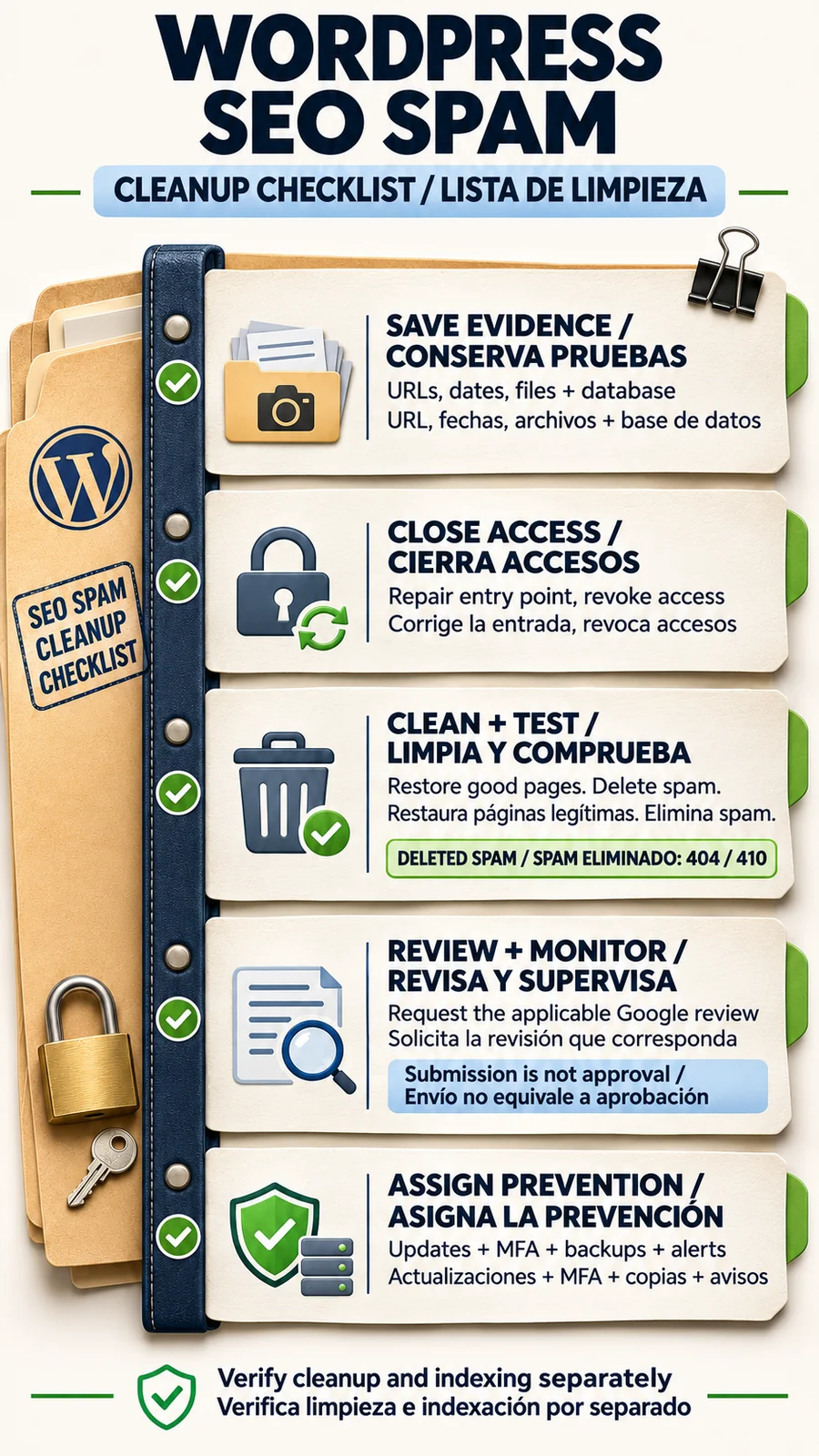
After cleanup, assign responsibility for updates and security notifications. WordPress hardening guidance covers maintained software, access controls, backups and monitoring. Use unique credentials and MFA where supported. Keep file/database backups that can support a verified restore, and review unexplained changes against the maintenance log.
For an agency or in-house team, name who receives alerts and who can involve the host after the cleanup contractor leaves. Keep the incident record available for that person. A dated explanation of the repaired entry point is more useful at the next warning than a note saying the search results looked normal.
Frequently asked questions
Can a WordPress SEO spam hack be hidden from the owner?
Yes. Content or redirects can depend on the visitor or referrer. A normal homepage view does not rule out a compromise. Investigate suspect URLs and the WordPress installation.
Does an empty site: search prove the site is clean?
No. Google says site: results need not show every indexed URL. Use them as investigation leads alongside Search Console and host-level checks.
Should deleted spam URLs return 404 or 410?
Attacker-created pages with no legitimate content to preserve should be removed with genuine 404 or 410 responses. Restore legitimate pages to their intended content instead.
Does Google's Removals tool clean the hacked site?
No. It suppresses results in Google Search temporarily, for about six months. Server-side remediation is still required, and a prefix request must avoid legitimate URLs.
Is a security review the same as a manual-action review?
No. Check both reports and use the review process for each issue actually listed. Submit after fixing its full scope. Keep the later decision separate from the submission receipt.
About the Author