Website Disappeared From Google Overnight? What to Check First
Why is my website not showing up on Google, even for your brand? Work in order: confirm the drop, rule out technical issues, then check Search Console.
You search your brand name, and your site isn't there. Yesterday it was. Rewriting everything suddenly feels like a reasonable morning plan.
If you're asking “why is my website not showing up on Google” after ranking yesterday, check three possibilities: technical blocks or errors, a manual action or security issue, and changes in Google's systems. Start with Search Console to confirm the drop, rule out your own changes, then review Google's reports before assuming an update.
A missing brand result deserves attention, but doesn't establish the cause. Treat a website not showing on Google as a diagnostic question before choosing a fix.
| What you see | What it can mean | What to verify next |
|---|---|---|
| No result for your brand | Deindexing, a block, a manual action, or a temporary systems issue | Performance dates, then homepage URL Inspection |
Few or no site: results |
Possible deindexing; results may be incomplete | Page indexing report |
| Clicks and impressions fall together | A drop with a date to investigate | Recent changes and Search Status Dashboard |
| noindex or robots.txt exclusions | A configuration worth investigating | Templates, plugins, and deploys |
| Manual actions or Security issues message | Google reported a problem | The report's instructions |
| Tracker falls, GSC doesn't | Data or timing disagreement | Search Console dates first |
| Checks are clean, visibility remains low | Possible ranking change or unconfirmed volatility | Document and monitor |
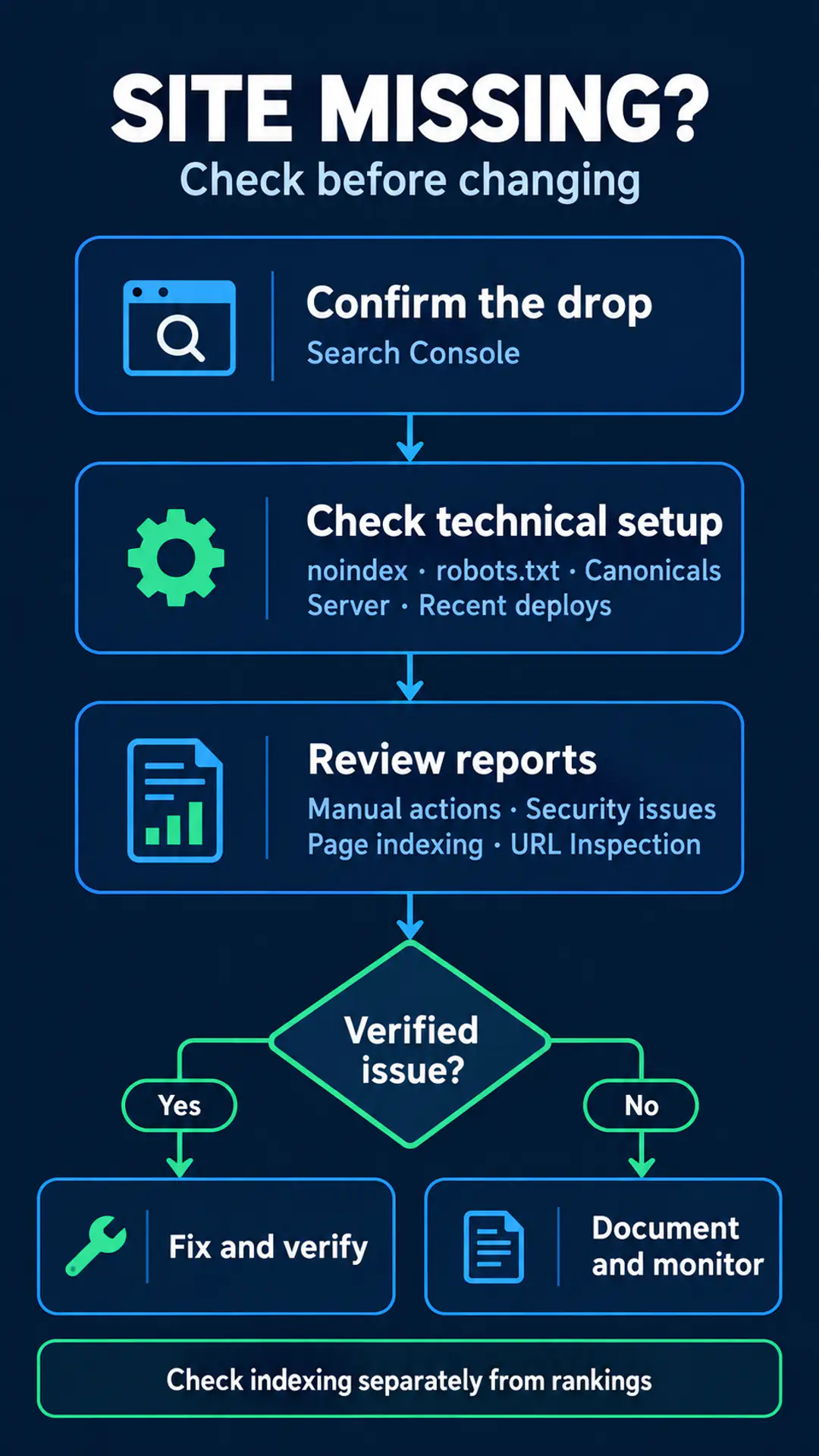
1. Confirm it's real before you touch anything
Confirm the drop in Search Console's Performance report and record the first affected date. A search result and a tracker chart are starting signals, not a diagnosis.
Search your brand name
Check the brand query you normally use. A private window or signed-out search is a reasonable precaution; it doesn't create perfectly neutral results. Record what you searched and what appeared.
Use site: carefully
Try site:yourdomain.com, but don't treat the result count as an index inventory. Google's site: operator documentation says results may not be complete. An empty result deserves investigation; it doesn't prove the whole site was removed.
Check Performance by date
Open the Performance report, review recent weeks, and find where clicks and impressions changed. Compare brand queries with non-brand queries. Keep the filters you used in your notes so later comparisons cover the same view.
Google's traffic-drop debugging guide also points to the Data Anomalies page for known reporting issues. Check that before treating an unexplained chart change as lost visibility.
I'd use GSC as the timestamp for the drop, then compare everything else against it. Keep the time you noticed the problem separate from the first affected reporting date.
2. Rule out your own technical issues
Check noindex, robots.txt, canonicals, server errors, and recent deploys before changing content. Start with the pages that matter to your business, including the homepage.
-
Check noindex. A noindex directive tells Google not to index a page. Review meta robots in page source and the X-Robots-Tag response header on key templates. Compare those findings with URL Inspection and its live test. Google's noindex documentation explains the directive. Check recent theme, plugin, and staging changes before removing anything intentionally excluded.
-
Read robots.txt. Look for a broad
Disallowintroduced around the drop. Verify the file on the live host and check affected URLs. robots.txt controls crawling; it doesn't directly control indexing. Don't treat a crawl block and noindex as interchangeable. For related context, see an indexation and crawlability case study. -
Verify canonicals. A canonical URL is the preferred URL for a group of duplicate or similar pages. Check
rel=canonicalin source and Google's selected canonical in URL Inspection. Look for unexpected staging, homepage, or other URL targets. Follow Google's canonical guidance, and record any mismatch before assuming it caused the drop. -
Check server and network errors. Review response codes, HTTP 5xx errors, timeouts, and DNS problems. Use response checks and URL Inspection's live test to investigate current availability. Google's HTTP and network errors documentation provides context. A successful test now doesn't establish what happened earlier.
-
Review recent deploys. List migrations, CMS updates, redirects, and CDN or WAF changes from the preceding days. Compare release timing with GSC and inspect affected pages. SEO migration support and a site migration case study provide related context. Timing alone doesn't prove responsibility; identify the actual change before rolling it back.
3. Check Manual actions, Security issues, and indexing reports
Search Console reports manual actions and detected security issues in their respective reports. Check those messages directly before describing the disappearance as a penalty.
A manual action is an action taken by Google's human reviewers over a policy violation. Open the Manual actions report, read any reported issue, and follow its instructions. Keep the reported scope in your notes. Related reading includes a manual action recovery case study and thin content manual actions; neither diagnoses your site.
Open the Security issues report for problems such as hacked content or malware. If there's a message, investigate the issue it identifies. A theory about a security-related algorithm doesn't replace this check.
Next, review the Page indexing report. Look for a rise in not-indexed reasons that matches your drop. Record the reasons and affected pages rather than combining every exclusion into one problem.
Use URL Inspection on the homepage and two or three key URLs. Note indexing status, Google's selected canonical, and last crawl. Run the live test to check the current page, keeping that result separate from the indexed record.
Clean reports narrow the investigation. They don't explain the drop or establish that every possible technical issue has been ruled out.
4. Why is my website not showing up on Google if nothing is broken?
If your URLs remain indexed but rank lower, investigate a ranking change rather than assuming deindexing. Deindexing means pages are no longer in Google's index.
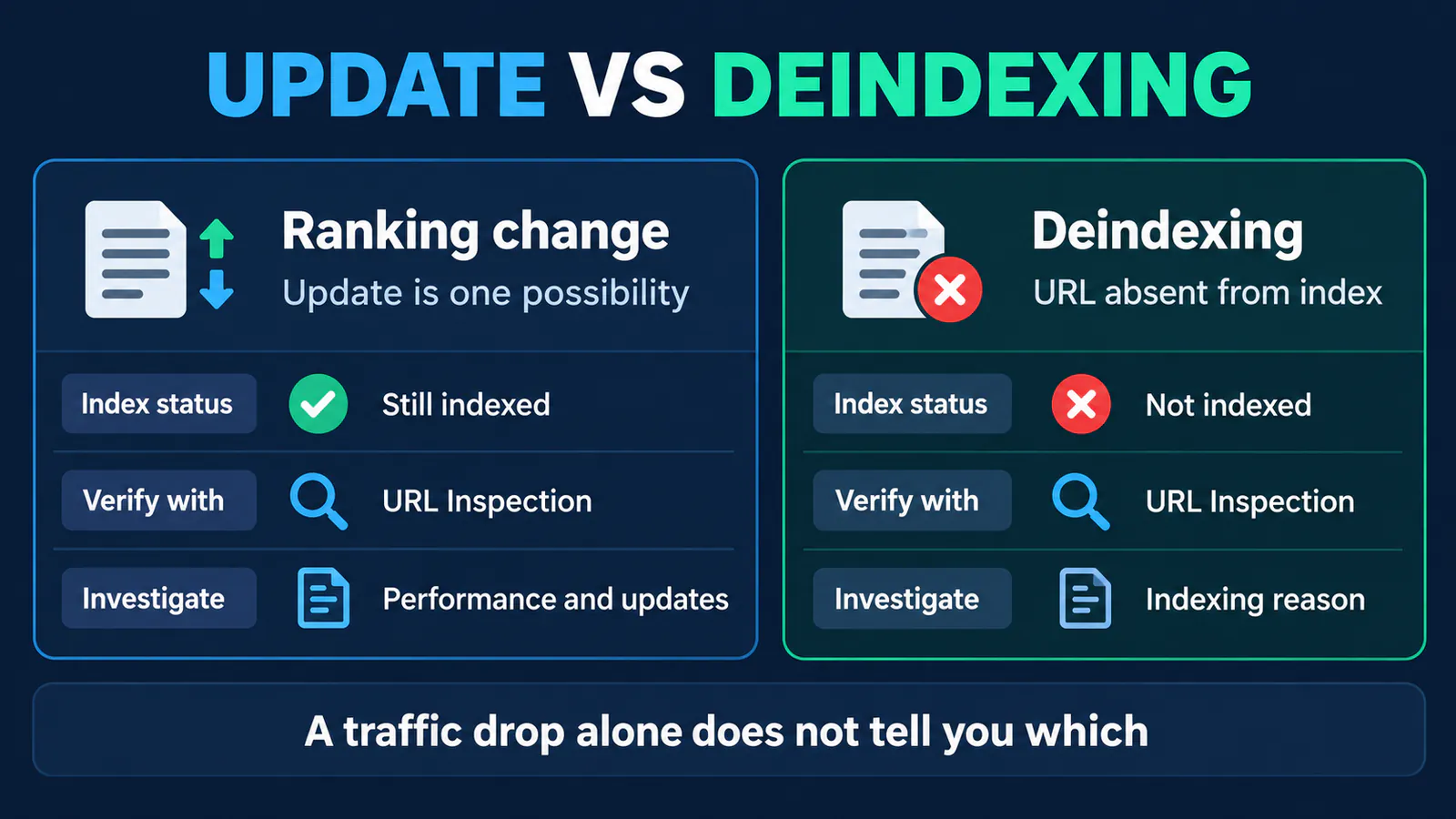
| Check | Deindexing | Ranking change or volatility |
|---|---|---|
| URL Inspection | Affected URLs aren't indexed | URLs remain indexed |
| Brand query | May disappear | Visibility can change; check indexing separately |
| Impressions | Investigate lost visibility alongside indexing | Can fall while URLs remain indexed |
| Next step | Find the indexing reason | Review Performance and update information |
Ranking volatility means changes in search positions. An unconfirmed update is a suspected systems change without Google's confirmation.
Check the Search Status Dashboard and the ranking updates list referenced in Google's debugging guide. For the October drop discussed here, Google had not confirmed an update. Silence doesn't establish what happened.
For context, see reading a core update in Search Console, the August 2026 spam update, and the June 2026 spam update. Those separate events don't identify October's cause.
Observed and attributed: In his October 21, 2026 post, Glenn Gabe described two sites in the same ultra-YMYL niche disappearing on a Sunday, including for brand queries. He said he confirmed this with the owners. The post doesn't identify the niche or sites.
In that case, Ahrefs showed the wrong drop date and no recovery. Semrush showed a drop and partial recovery with dates far off. Sistrix showed the September drop but nothing recent. Those observations concern this case, not every tracker result. Third-party tools sample and model visibility; use their charts for context and GSC for dating your drop.
Speculation: Gabe compared it with September 4, which he described as an unconfirmed update or glitch. He speculated about a security-type algorithm. That was his hypothesis, not a Google explanation.
5. What to do meanwhile: when to wait and when to change things
Fix a verified problem you caused or Google reported. If every check is clean, document and monitor before making broad changes.
Remove an unintended noindex, correct a crawl block or canonical, resolve server errors, or roll back a verified bad deploy. Follow the instructions for any manual action or security issue. Recheck the affected URLs afterward and record what changed.
If you cannot connect a proposed fix to evidence, I'd hold it. Rewriting content, redirecting pages in bulk, or migrating creates additional changes to investigate. Google's debugging guide says there “might not be anything fundamentally wrong.” That supports caution, not a prediction that your site will return.
Expert Insight
I'd fix anything we can tie to a verified error, then check the affected pages again. If every report is clean, I'd record the timing and review GSC daily. I'd avoid changes I can't connect to the evidence.
Waiting doesn't promise recovery. Gabe's sites came back, but their outcome doesn't predict yours. Set the next review around the same reports and URLs so you can identify a real change.
6. Document the drop and the recovery
Keep a drop log that separates observations, assumptions, and actions. It gives you a record to compare when visibility changes again.
Gabe reported that both sites returned Friday 10/16 at 8:15 PM. No time zone was given. His post describes the drop as occurring on a Sunday, but the calendar date is ambiguous; don't reconstruct one from those details.
I'd record timing that precisely when available, while labeling where it came from. The time an owner noticed recovery and the date visible in a report are separate observations. Neither alone identifies the cause.
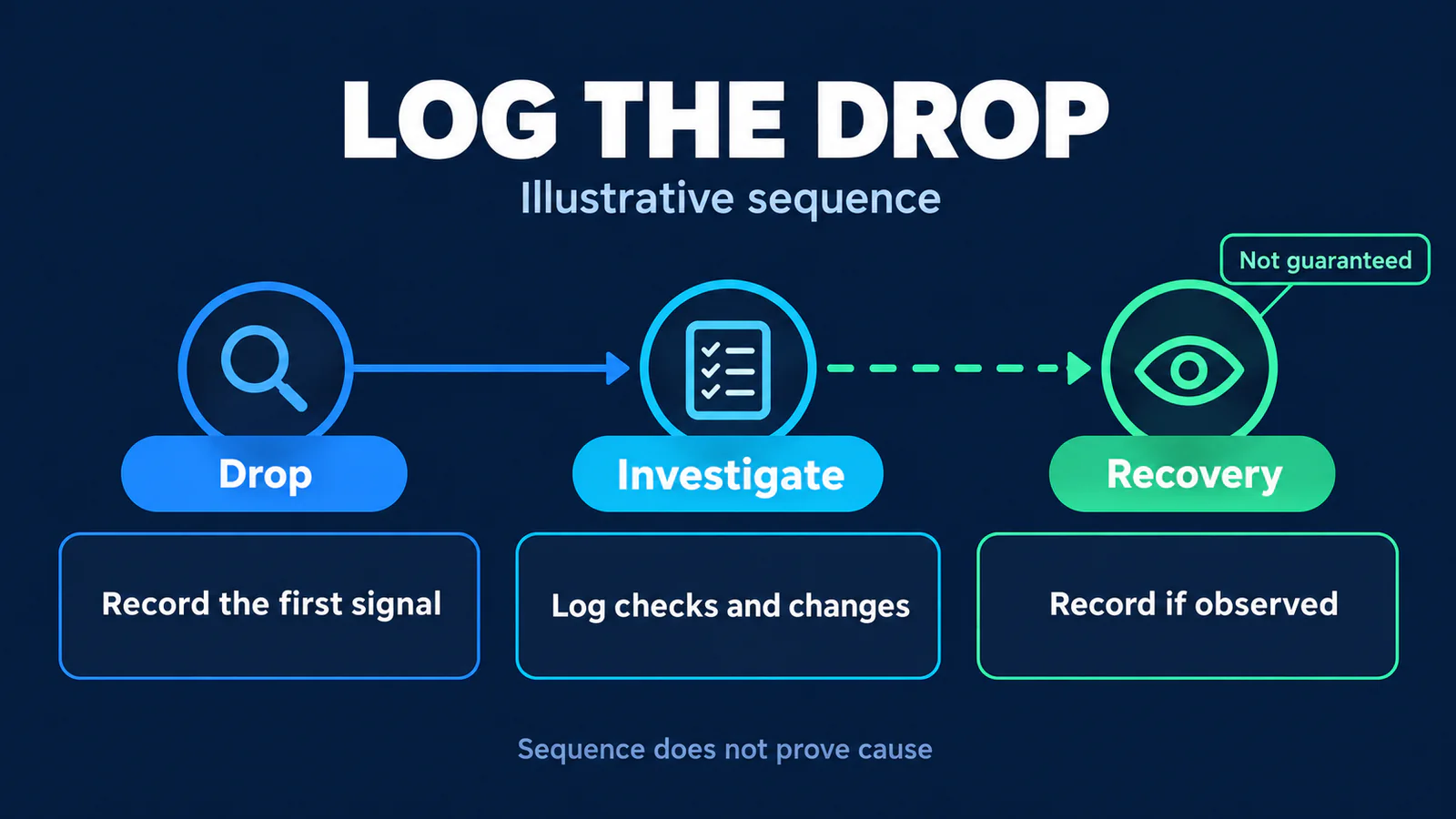
Drop log
- [ ] Date and time you first noticed the drop
- [ ] Brand and top non-brand queries checked, with results
- [ ] GSC first affected date and clicks/impressions before and after
- [ ] Page indexing and URL Inspection findings for key URLs
- [ ] Manual actions and Security issues status
- [ ] Recent deploys, plugin/CMS updates, CDN and server changes
- [ ] Search Status Dashboard and ranking updates list status at the time
- [ ] Each change you made and when
- [ ] Recovery date and time, if observed, and preceding changes
A recovery after a change doesn't prove that change caused it. Record both without converting the sequence into a conclusion.
FAQ
Why is my site missing even for my brand name?
A missing brand result is a strong signal to investigate, but doesn't establish a penalty. Confirm the change in Performance, then inspect your homepage. Check technical configuration, Manual actions, Security issues, and indexing before attributing it to Google's systems. A website not showing up on Google needs evidence before a fix.
Does site: show every indexed page?
No. Google's documentation says results may be incomplete. Use the query as a rough signal, then check Page indexing and URL Inspection. Keep the search result separate from the indexed status reported for individual URLs. A small result set alone doesn't establish that all missing results were deindexed.
How do I check for a manual action?
Open Search Console's Manual actions report and read any message there. Follow the instructions for the reported issue and scope. Don't infer a manual action from traffic loss, a missing brand query, or somebody else's recovery story. Keep Security issues as a separate check in the same investigation.
Was there a Google update today?
Check the Search Status Dashboard and Google's ranking updates list. Compare their information with your GSC dates, while keeping timing separate from causation. If no relevant update is listed, you haven't established an update as the cause. For the October case here, Google had not confirmed an update.
Why does my tracker show a different date?
Gabe documented disagreements among Ahrefs, Semrush, and Sistrix in this specific case. Their charts didn't describe the same timing or recovery. Keep those findings as context rather than generalizing that trackers always fail. Use your own Search Console dates to anchor the investigation, and record any disagreement separately.
Will my site come back on its own?
No recovery timeline can be promised. Gabe reported sites returning, but that observation doesn't predict another site's outcome. Fix verified problems and keep monitoring when checks are clean. If visibility returns, document what changed beforehand, including whether you changed anything at all. The sequence still doesn't establish the cause.
A missing brand result is a signal to investigate, not proof of a penalty.
How Growing Search can help: if these checks leave the drop unexplained, we can review your Search Console data, recent changes, and indexing reports with you. No provider controls Google's systems. A clear diagnosis helps you decide what's worth changing.
About the Author