Sitemap Couldn't Fetch in Search Console: Crawl Demand Beyond Valid XML
A valid sitemap returning 200 can still show Couldn't fetch. Check Google's access and host health first. If both are healthy, investigate crawl demand and content quality before changing the XML.

The sitemap opens in a browser, returns 200 and passes XML validation, yet Search Console still shows Couldn't fetch. Rebuilding the file at that point needs a reason. Google's documented causes include low crawl demand, and John Mueller has explained that the status can appear when Google's systems skip a valid sitemap.
The label can be misleading because it sounds like a file defect even when the cause is outside the XML. That does not make every failed fetch a quality problem. Start with the official access checks and the host's serving evidence before deciding that content and crawl demand deserve the next investigation.
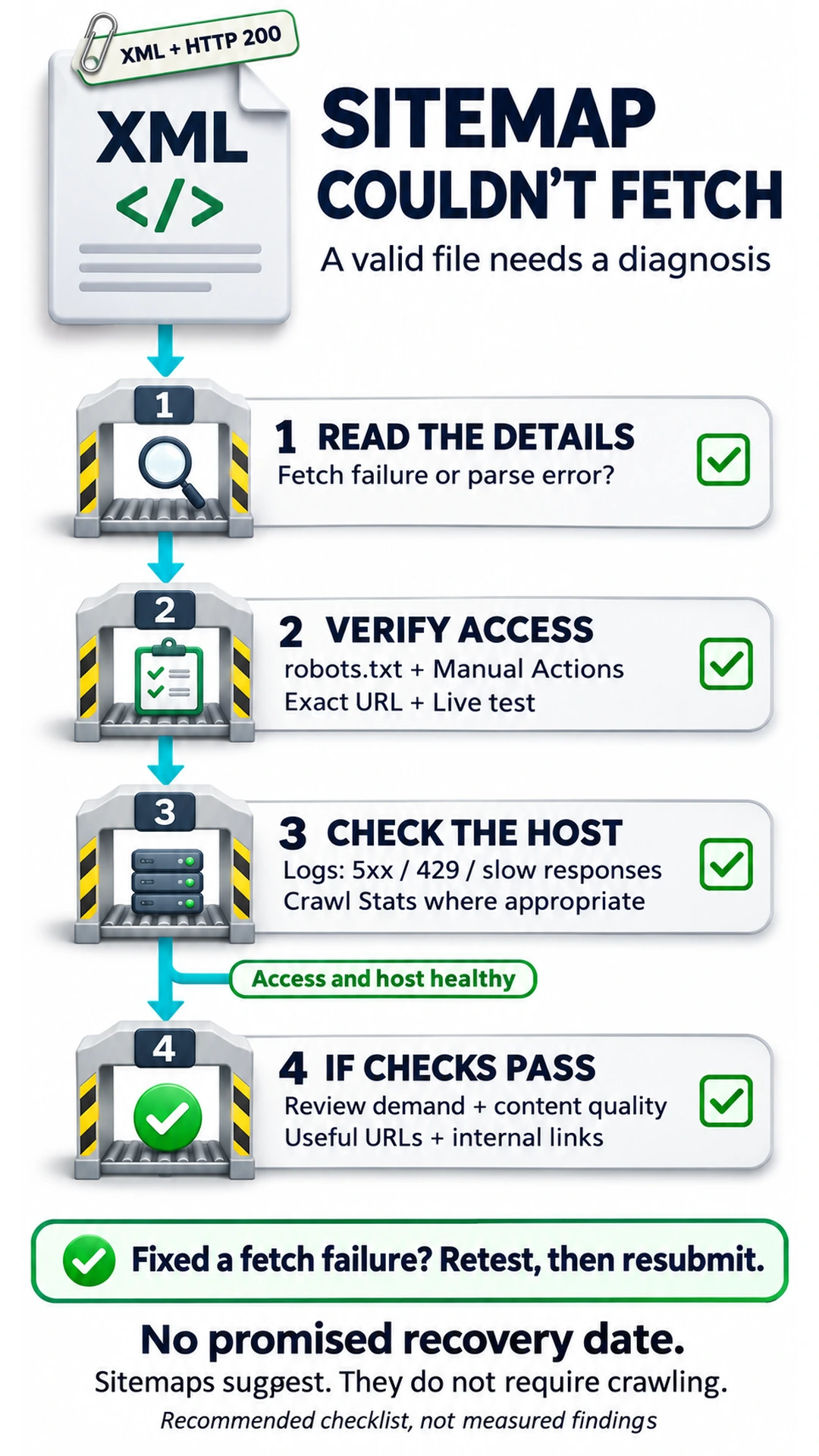
TLDR. Separate fetching from parsing, check robots.txt and Manual Actions, then test the exact sitemap URL with URL Inspection. Investigate host availability if access appears successful. When the file is reachable and the host is healthy, review the intended crawl inventory and content usefulness instead of making speculative XML changes. None of those steps promises a date when the status will clear.
Fetch status, parsing errors and report scope
The Sitemaps report documentation distinguishes the status of retrieving the file from errors encountered while reading it. Use the details to choose the right investigation.
| Report wording | What Google reports | Diagnostic consequence |
|---|---|---|
| Success | The sitemap was fetched and read without errors. | Verify page crawling and indexing separately. |
| Couldn't fetch | Google could not fetch the sitemap. | Open the fetch details and check access before changing syntax. |
| Sitemap had X errors | Google fetched and partly read the sitemap but encountered errors. | Investigate the specified errors rather than assume a demand issue. |
| Sitemap could not be read | The details page describes a fetch failure. | Expand the error for the reason shown. |
A validator cannot test Google's scheduling decision, and a successful browser request does not establish what happened during Google's requests. A valid, publicly accessible, robots.txt-linked sitemap can therefore retain this status. The official low-demand cause and Mueller's explanation both allow that possibility.
There is also a limit to what this report lists. It shows sitemaps submitted through the report or the API, rather than every sitemap Google knows about. A sitemap discovered only through robots.txt does not appear in that submission history. Its absence from the list does not establish that Google cannot discover it.
Google's official causes for Couldn't fetch
The official fetch-error list includes all of the following, so a diagnosis that jumps straight to quality is incomplete.
- A robots.txt block. Google respects robots.txt when fetching sitemaps. A rule that prevents retrieval needs correcting.
- An unresolved manual action. Google says sitemaps are not read while a site has an unresolved manual action. Check the report rather than infer an action from the sitemap status.
- A wrong sitemap URL. The submitted address may return HTTP 404 because the file is not there.
- A general retrieval error. Server unavailability can prevent a fetch. Some errors are transient, so check whether later attempts still encounter them.
- Low crawl demand. Google's Help connects higher quality of the site's content with higher demand for crawling the sitemap.
That final cause explains why an XML-only checklist can miss the problem. It does not remove the need to rule out the other causes, and it does not turn the status into a public quality score.
Mueller's explanation of skipped valid sitemaps
In the October 1, 2026 Search Off the Record episode, Do sitemaps still matter?, Martin Splitt poses the valid-file problem directly. The XML validates, the sitemap is public and robots.txt links to it, but Search Console still reports a failed fetch. John Mueller gives two explanations that matter after those checks.
Discussing host load, Mueller says Google's systems may be too occupied with other work to fetch the sitemap. The status can describe a request they never had time to make. His wording is “we didn't have time to actually fetch it.” This is a reason to investigate capacity and availability, without assuming that a particular server error occurred.
His other explanation concerns crawl demand. Google's systems may decide they have already obtained enough from the site and skip the sitemap for now. Mueller connects that demand to perceived site quality. He says that if the site's quality later improves substantially, Google may use the sitemap, but supplies no timeframe.
These are explanations of possible system behavior, not a diagnosis of your domain. The operational distinction follows Google's crawl-budget documentation. Crawl capacity concerns how much Google can crawl without overwhelming the host. Crawl demand concerns how much it chooses to crawl. Available capacity does not require Google to use it.
The access checks before a demand diagnosis
I would finish the access checks before treating a valid sitemap as a content-quality problem. Begin with the exact URL in the sitemap details. Confirm that the failure is fetching rather than a parsing error and record the expanded message. If a concrete parsing defect is reported, address that defect. A demand explanation should not be used to dismiss it.
Check robots.txt for a rule blocking the sitemap URL. Then open the Manual Actions report and establish whether an unresolved action exists. These are separate causes in Google's list, with different remedies.
Visit the submitted sitemap URL in a browser. Compare the address in Search Console with the file you are testing, including its hostname and path. A working sitemap at another address does not repair a submitted URL returning 404. If the address is wrong or the file is unavailable, fix that problem before moving to content work.
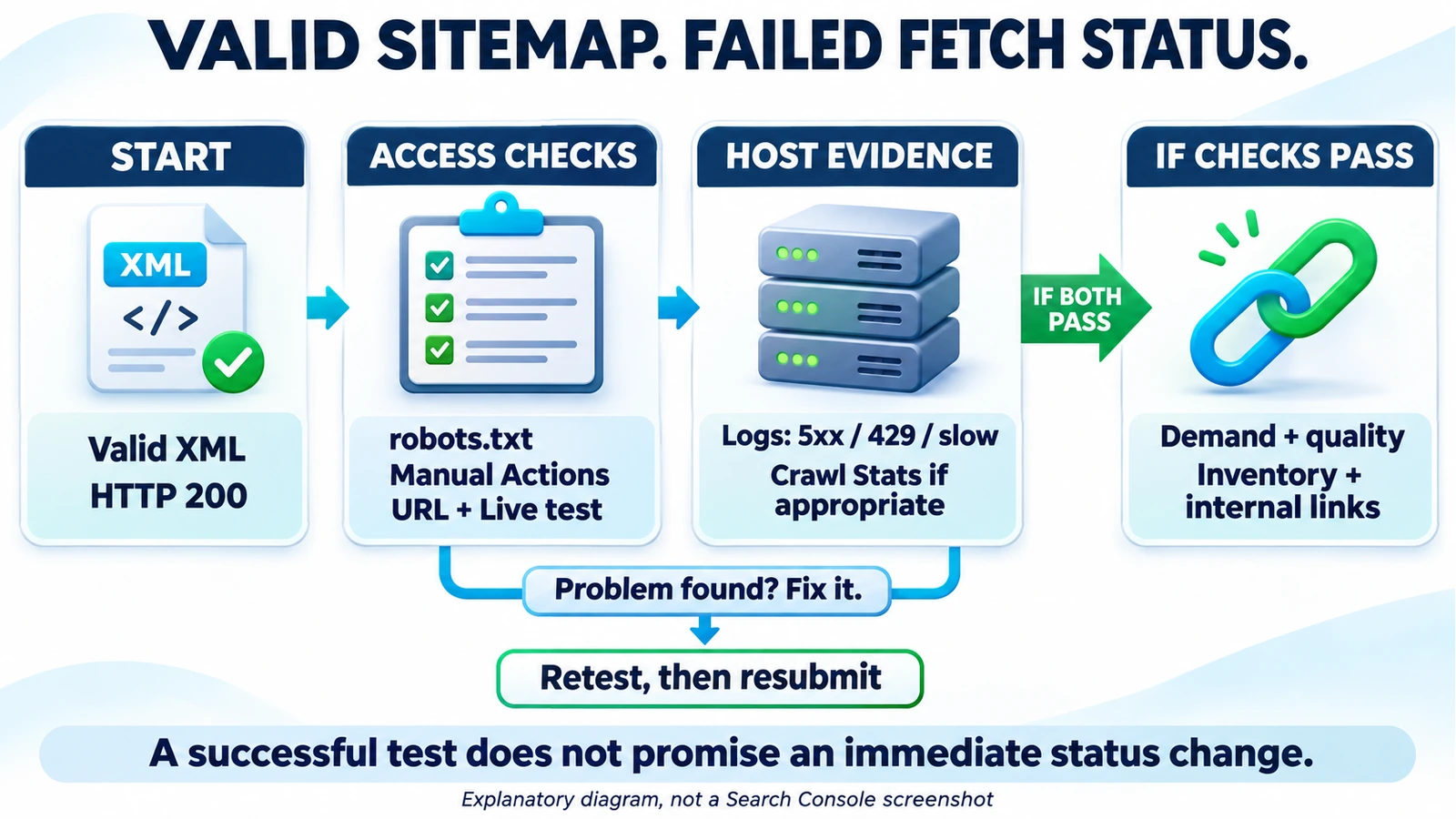
Next follow the sitemap Help debugging procedure. Copy the sitemap URL into URL Inspection and choose Live test. Expand Page availability. The target results are Crawl allowed? = Yes and Page fetch = Successful.
Save the test time and result. A successful live fetch is evidence that Google could access the file during that test. It does not promise an immediate status change in the Sitemaps report or establish that all previous requests succeeded.
Host load and availability beyond a 200 response
An intermittent serving problem can survive a successful manual test. Check server logs for Googlebot requests to the sitemap URL, then examine the host generally. Look for 5xx responses, 429 rate limits or slow responses that could restrict crawling. Google's capacity guidance explains that deteriorating response times and these error types can make Google crawl less.
Use logs for the URL-specific investigation. Google's crawling-error guidance states that Search Console does not offer a crawl history filterable by URL or path. If logs are missing or incomplete, retain that uncertainty rather than write that Google definitely skipped the file because of quality.
The Crawl Stats report can help with host-level evidence, but it is available only for root-level properties, such as a Domain property or a URL-prefix property at the root. The report targets advanced users. Google says sites with fewer than about a thousand pages should not need this level of crawl detail. A small-site investigation can begin with direct access tests and the hosting evidence available.
Where the report is appropriate, examine host availability and average response time alongside server-error trends. Slower responses or rising errors support investigating serving health. If URL Inspection shows Hostload exceeded, capacity also warrants attention. Do not infer that warning merely because a sitemap has failed to fetch.
Fix documented availability problems, then verify the serving behavior again. Google cautions that better availability will not necessarily increase crawl budget because demand still influences the crawl rate. More server capacity is a response to a capacity constraint, rather than a substitute for useful content.
Crawl demand and the intended page inventory
Once the sitemap is reachable and the host evidence is healthy, I would stop changing the XML and review which pages deserve to be crawled. If the official access checks succeed and the host is healthy, treat the remaining status as a demand/quality problem for the next round of work. This is practitioner guidance, grounded in the documented causes. It is a working diagnosis after exclusions, without a Search Console test that proves Google's quality assessment.
Review which URLs the sitemap recommends. Google's inventory guidance identifies duplicates and unwanted URLs as a controllable source of wasted crawling effort. Keep the sitemap aligned with the pages you intend Google to crawl. An index-bloat audit by page purpose can help make those decisions without setting a deletion quota.
Remove thin or duplicate URLs from the sitemap when they do not justify inclusion in the intended inventory. Review orphan pages individually. If an orphan page remains important, strengthen its internal links and usefulness. If it is obsolete and no longer belongs in the crawl inventory, exclude it and decide what should happen to the page itself. Removing a URL from the file alone does not improve its content or remove it from Google's index.
Content work should answer what the page contributes for a reader. Google's helpful-content questions ask about original information and meaningful value beyond rewriting other sources. Improve an incomplete answer, consolidate unnecessary duplication where justified and make important pages accessible through relevant internal links. These recommendations support a better site inventory. They do not establish that trimming a sitemap will clear the status by a particular date.
Keep adjacent problems separate. If Google has crawled a useful page without indexing it, use the Crawled, currently not indexed diagnosis. If the concern is lost visits, investigate organic traffic decline across demand, clicks and rankings. The difference between Googlebot crawling and search clicks also matters when judging the outcome of crawl work.
Resubmission and unsupported XML fixes
Google advises against submitting the same unchanged sitemap multiple times per day. Repeated submission does not address the content or inventory issue in a demand hypothesis.
Resubmission does have a documented role. If an actual fetch failure has been fixed, submit the sitemap again. Major changes can also warrant resubmission. Where there are no critical updates requiring immediate processing, the Sitemaps Help recommendation is to let Google follow its regular schedule.
Splitting a valid sitemap or adding a sitemap index is not a documented fix for crawl-demand Couldn't fetch. Changing the filename does not establish a demand improvement either. Correct a stated syntax defect when one exists, but do not start by rewriting valid XML. Third-party indexing tools do not provide a documented remedy for the diagnosis described here and are not recommended.
A diagnosis checklist with realistic expectations
Use an evidence note to make the next action reviewable. I would record a successful fetch test separately from any later change in crawling or indexing. Each row should explain why a specific change is warranted, with missing evidence left explicit.
| Evidence to retain | Decision it supports |
|---|---|
| Exact submitted URL, report status and expanded error | Fetch investigation or a specified parsing repair |
| Robots.txt review, Manual Actions result and dated live-test fields | Access repair, or progression to host checks |
| Sitemap and host log findings, with Crawl Stats where appropriate | Serving repair, or a demand hypothesis with stated limits |
| Page-purpose review and internal-link findings | A justified inventory or content task |
| Successful retest after an identified fetch fix | Resubmission of the repaired sitemap |
Google says it continues trying failed fetching or parsing for a few days and can then stop attempting that sitemap URL. After fixing a genuine fetch problem, resubmit. Those retry days describe failed retrieval attempts, rather than a promised recovery period for content quality.
For demand, the official documentation connects content quality with crawl interest, while Mueller says Google may use the sitemap if quality later improves substantially. Neither supplies a date for that change. The Crawl Stats documentation states, “You can't tell Google to increase your crawl rate.”
Sitemaps remain suggestions to Googlebot, rather than requirements to crawl every URL or to crawl immediately. Even a fetched sitemap offers no guarantee of page crawling or indexing. Close the access investigation when its evidence supports that decision, and judge later page outcomes with their own crawl and indexing records.
Frequently asked questions
Can a sitemap return 200 and still show Couldn't fetch?
Yes. A successful response does not establish why Google's systems did not fetch the sitemap. Official causes include low crawl demand, and Mueller describes skipped valid sitemaps related to host load or demand. Check access and host health before adopting that explanation.
Is Sitemap could not be read the same as an XML parsing error?
Google uses Sitemap could not be read in its fetch-failure guidance. Expand the details to inspect the reason. Sitemap had X errors means the file was fetched and partly read but encountered errors, which need their own investigation.
What should the sitemap's Live test show?
In URL Inspection, inspect the sitemap URL with Live test and expand Page availability. Google's target results are Crawl allowed? = Yes and Page fetch = Successful. A successful test does not promise an immediate status update.
Should the sitemap be resubmitted after Couldn't fetch?
Resubmit after fixing an identified fetch failure. Google advises against submitting the same unchanged sitemap multiple times per day and recommends its regular schedule when there are no critical updates.
Does splitting a sitemap fix low crawl demand?
Google does not document splitting a valid sitemap or adding a sitemap index as a fix for demand-related Couldn't fetch. Review inventory and content usefulness after the technical checks pass.
How long do quality improvements take to change the status?
No recovery deadline is given. Google connects content quality with demand, and Mueller says Google may use the sitemap if quality later improves substantially. Google retries failed fetching for a few days, but that is not a timetable for a quality-related recovery.
About the Author