Branded vs Non-Branded Traffic in Search Console: How to Split It During a Core Update
Separate brand and non-brand clicks with Google’s filter on eligible properties, or use a labeled custom regex. Compare the same scope before diagnosing a decline.

When total Search Console clicks fall during a core update, a sitewide content rewrite needs more evidence. Start by separating searches connected to the brand from searches that introduce the site without naming it. A decline concentrated in one group gives the investigation a different starting point from a decline affecting both.
Google's November 16, 2026 Search Analytics API update makes that split available in automated reporting. The interface filter already existed. The useful change for a reporting workflow is access to the same classification through the API, with eligibility and request limits that need to remain visible.
At a glance. Use the branded queries filter in an eligible property's Search results Performance report, or group/filter by brandedClassification in the API. Compare both groups with the same dates and reporting scope. Use the losing segment to choose the next check, while keeping demand, visibility and CTR as possible explanations.
Branded query classification and eligibility
The branded queries announcement defines a branded query to include the site's brand name, variations or misspellings, and closely associated products or services. Google's examples include Google, Gogle and Gmail. A query can qualify without containing the literal brand name. Non-branded covers the other queries.
Google's internal AI-assisted system performs the classification. It recognizes brand names in different languages and queries referring to a site's unique products or services. Some searches may be misidentified, so the label deserves a review when it affects a reporting decision. Applying the filter has no effect on Search ranking.
The March 11, 2026 update says the filter is available to all eligible sites. That still means top-level properties with sufficient query and impression volume. URL-path properties, such as https://example.com/path, and subdomain properties, such as developers.google.com, are excluded. Google has not published a numeric volume threshold. A missing option does not justify inventing one or promising when a site will qualify.
Brand demand, discovery and a core-update diagnosis
Google says branded queries typically lead to higher-ranking pages from the site and higher CTR. It describes non-branded queries as an opportunity for organic growth because they show discovery without an initial intention to visit that site. These are qualitative statements. They supply no expected percentage split or CTR benchmark for a report.
For diagnosis, branded clicks deserve their own comparison because a change in brand-related interest could affect them. But clicks also depend on the site's visibility and the user's choice to click. A branded decline alone cannot establish falling demand. Likewise, non-brand losses warrant a review of discovery queries and their landing pages, while leaving demand changes open as an explanation.
If branded clicks fell, I would check visibility and CTR before describing the change as lower brand demand.
Compare absolute clicks in each group before discussing their share of the total. A rising branded share can result from falling non-brand clicks while branded clicks stay unchanged. Calling that brand growth would describe a gain the report has not measured.
An overlap with a core update gives the investigation a time reference. The filter cannot isolate an update's contribution or establish that a content rewrite will help.
Before recommending a rewrite during a core update, I would separate brand and non-brand clicks and identify which pages account for the loss.
Use the organic traffic decline diagnosis to test the affected pages. If AI search is part of the hypothesis, the AI Overviews and brand search analysis addresses that question separately from the observed brand/non-brand change.
How to split the Performance report
Open the Search results Performance report for an eligible property. Set a date comparison that matches the question being investigated, then keep its search type and country/device scope fixed through the comparison.
- Apply the branded queries filter and select Branded.
- Record or export clicks and impressions, with CTR and average position.
- Switch to Non-branded and repeat with the same settings.
- Examine the pages and queries behind the larger loss before proposing an edit.
The filter applies across web, image, video and news in the Search results Performance report. Choose the relevant search type rather than mixing different comparisons in one conclusion. The Insights report also offers a branded versus non-branded breakdown of total clicks, useful for orientation before the detailed investigation.
Save the property and settings with the export. A country or device change between the views would weaken the comparison even if both charts were labeled correctly.
Search Analytics API requests
For an automated report, the Search Analytics query reference allows grouping or filtering by brandedClassification. Grouping retrieves the classification as a dimension. Filtering accepts only equals, with BRANDED or NON_BRANDED as the expression.
This illustrative request body selects branded Web data for the announcement date. The one-day window demonstrates syntax and is not a recommended diagnostic baseline. It contains no sample results or measured site data.
{
  "startDate": "2026-11-16",
  "endDate": "2026-11-16",
  "type": "web",
  "dimensions": ["date"],
  "dimensionFilterGroups": [
    {
      "filters": [
        {
          "dimension": "brandedClassification",
          "operator": "equals",
          "expression": "BRANDED"
        }
      ]
    }
  ]
}
Use NON_BRANDED for the other segment. To group both in one request, use "dimensions": ["date", "brandedClassification"] and omit the classification filter. Keep the date window and other settings comparable across exports.
Classification data is available from February 21, 2026. Filtering or grouping by brandedClassification cannot be combined with a query filter in the same request. Do not design an export that depends on applying both together.
The classification also retains the interface's property requirements. Ineligible properties return no rows. Mark classification as unavailable in that situation, rather than inserting zeroes and implying an absence of brand demand.
Country/device lists and multimodal reporting
The same API release adds dimensionFilterGroups[].filterLists[] for several country or device values in one request. It matches a row when its dimension value exactly equals any supplied expression. Country values use ISO 3166-1 alpha-3 codes. Devices use DESKTOP, MOBILE or TABLET. A request cannot filter the same dimension in both filters and filterLists.
The other addition, type=webMultimodal, retrieves performance from Google Lens, Circle to Search on Android and image uploads in Google Search. These additions can support a more specific reporting scope, but neither removes the branded-classification eligibility rules. Keep a multimodal series labeled separately when comparing it with Web data.
Query regex for ineligible properties
Use the existing Filter by query option to create a custom brand regex when Google's classifier is unavailable. Include known brand spellings and relevant product or service names. Preserve the exact expression and use its corresponding exclusion for the custom non-brand view.
Label those exports as a custom query-regex split. Google's classification is explicitly not based on regex and can identify brand relationships beyond literal name matches. A manually maintained expression cannot be presented as an equivalent implementation, even if it includes several spellings.
Changing from regex to Google's classifier changes the measurement method. Annotate the change and review the definitions before presenting the series as a continuous trend. A difference between exports can come from the classification method as well as performance.
I would keep a regex export and Google's classified export as separate series until their definitions have been reviewed.
Four practitioner patterns for the next check
This decision aid is practitioner guidance, not a Google framework. Begin with the direction of clicks, then inspect impressions and CTR alongside positions for comparable queries. Each pattern suggests an investigation and leaves the cause unresolved.
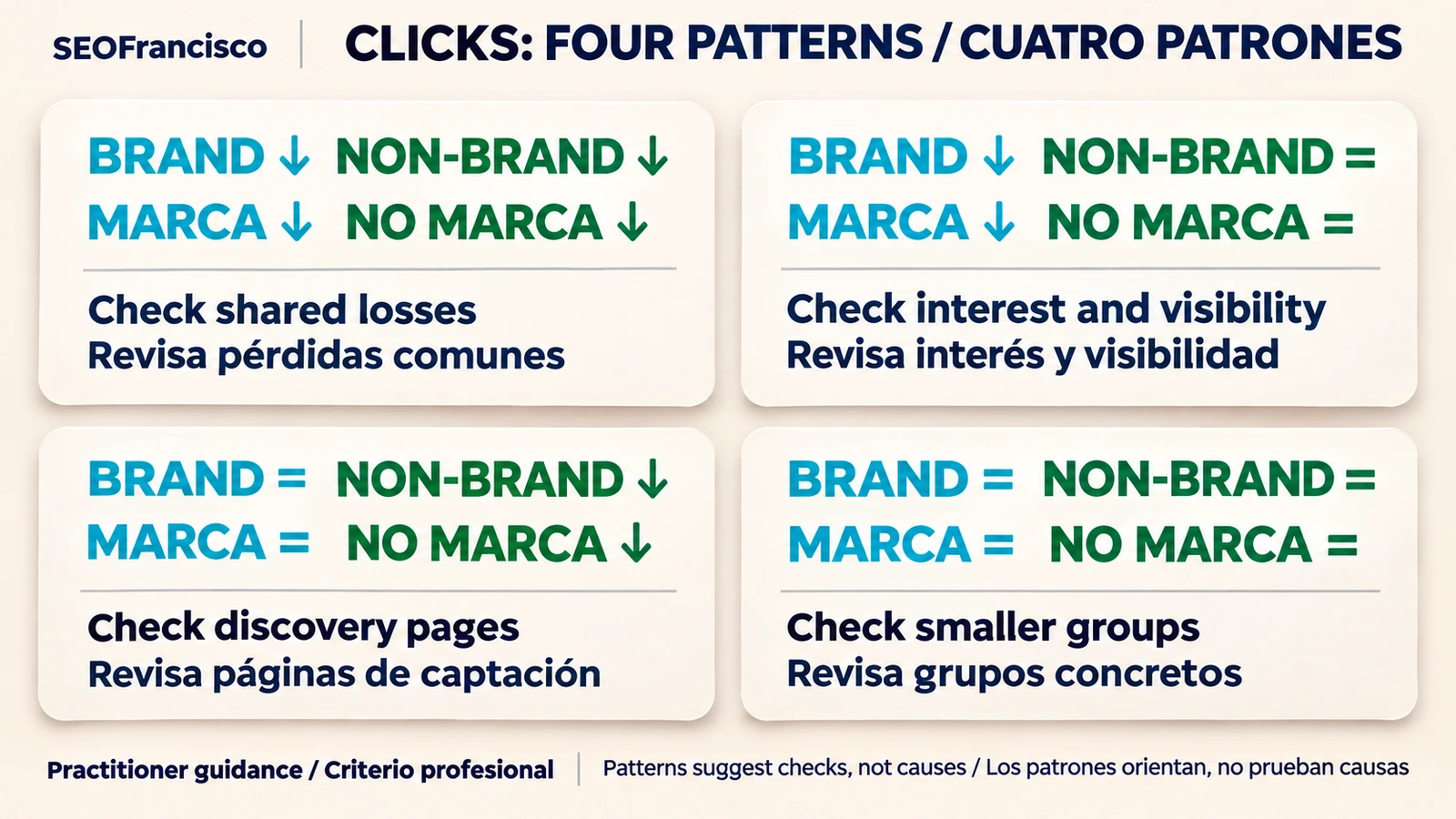
| Observed pattern | Next check | Limit on the conclusion |
|---|---|---|
| Both groups decline | Compare affected pages, technical state and demand context across both groups | Shared timing does not prove a common cause or core-update impact |
| Only brand declines | Check brand-query impressions, positions and CTR, then independent evidence of changing interest | Fewer branded clicks alone do not establish lower brand demand |
| Only non-brand declines | Locate discovery queries and landing pages, then investigate comparable-query rankings and search results | The segment loss does not justify rewriting every non-brand page |
| Both remain stable | Check smaller page or market groups, and any separate analytics discrepancy | Stable totals can conceal offsetting gains and losses |
Choose a page change only after the follow-up identifies a weakness. If the affected queries retain comparable visibility but produce fewer clicks, review click opportunity before treating the page's content as the demonstrated problem. If visibility also falls, investigate that loss without assuming the segment label has explained it.
A short brand/non-brand reporting checklist
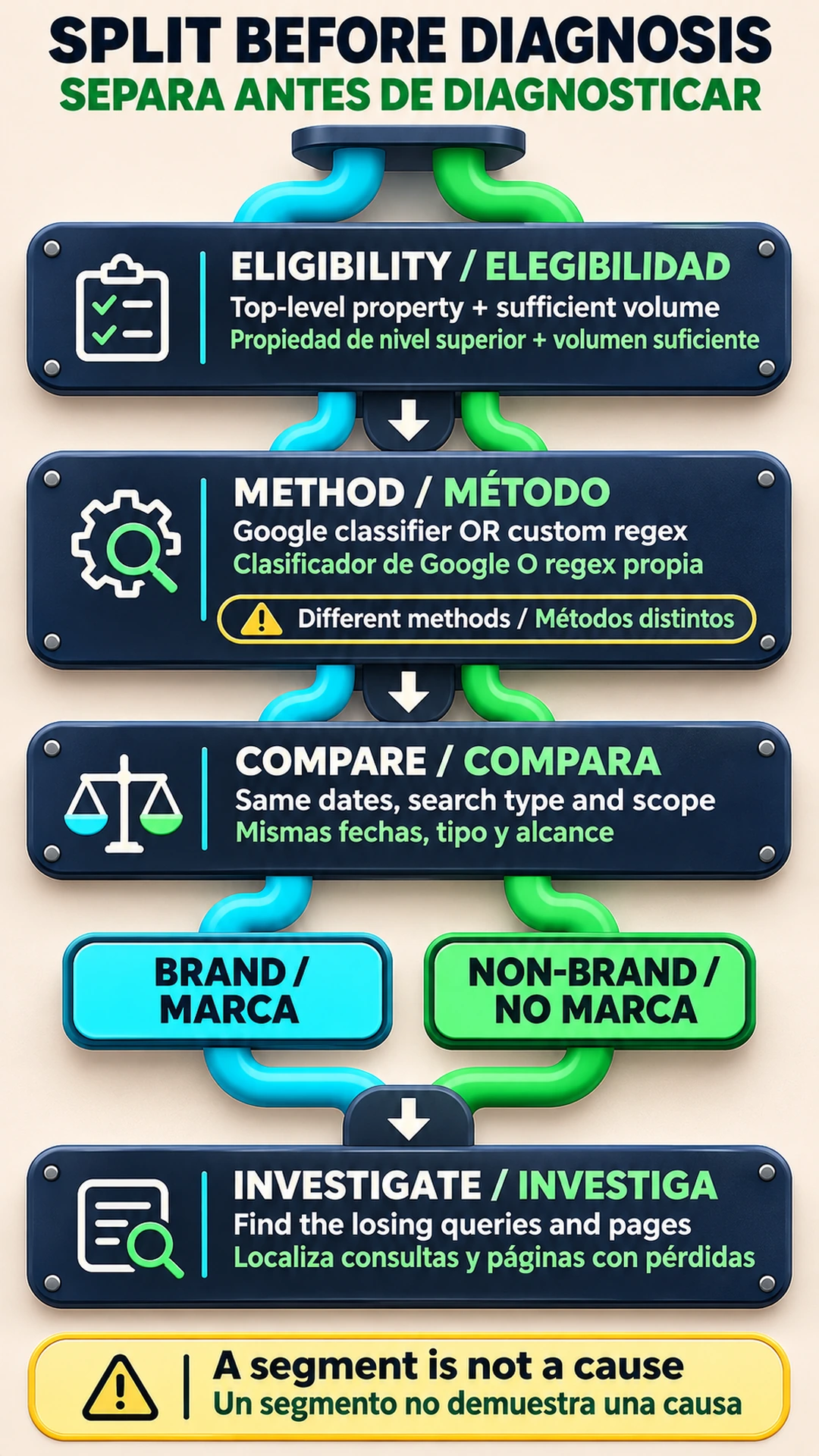
- Record property eligibility, comparison dates and search type, with the country/device scope.
- Name the classification method. Save any custom regex and note method changes.
- Show absolute clicks and impressions for both segments, with CTR and position for investigation.
- Identify the affected pages and queries, the leading explanation and the evidence needed to test it.
- Keep core-update timing and classification limits visible before recommending changes.
The useful reporting outcome is a specific next action supported by the affected searches. Preserve the unresolved explanation beside that action so a subsequent review can test the diagnosis rather than inherit it as fact.
Frequently asked questions
Which properties can use Google's branded queries filter?
Only top-level properties with sufficient query and impression volume are eligible. URL-path and subdomain properties are excluded. Google publishes no numeric volume threshold. The March 11, 2026 update made the filter available to all eligible sites.
Does the branded queries filter affect rankings?
No. The filter segments reporting data and has no effect on Google Search ranking. A decline in either segment still requires investigation of the affected searches and pages.
How do branded filters work in the Search Analytics API?
Use brandedClassification with the equals operator and BRANDED or NON_BRANDED. Data begins February 21, 2026. Classification grouping or filtering cannot share a request with a query filter. Ineligible properties return no rows.
Can query regex reproduce Google's classification?
No. Regex matches a custom set of text rules. Google's AI-assisted system can identify brand names in different languages and unique products or services without a brand mention, though it can misidentify some queries. Label regex exports as a different method.
Does a non-branded decline prove a core update hurt the site?
No. It identifies a segment to investigate. Compare the affected queries and pages, then test visibility, demand and CTR explanations. Overlapping timing alone does not establish a core-update cause.
About the Author