Googlebot Still Crawls, Clicks Still Drop: How to Read Crawl vs. Referral Data
Googlebot crawling but traffic dropping? Use server log analysis for SEO: compare Googlebot hits with Search Console clicks by section, then check the SERP.
You open Search Console: clicks are falling, but Googlebot apparently missed the memo.
Crawl volume, measured through server log analysis for SEO, reflects Google's demand for your URLs, not users' demand for your result. Compare verified Googlebot hits from server logs with Search Console clicks and impressions by section. Where crawl holds and clicks drop, study the SERP before blaming anything.
If you're seeing Googlebot crawling but traffic dropping, separate the signals before writing the explanation.
| Signal | What it tells you | Where it comes from |
|---|---|---|
| Googlebot hits in logs | Verified crawler requests reaching your server | Server logs, after bot verification |
| Crawl Stats report | Google's crawl history, responses and host health | Search Console Crawl Stats |
| GSC impressions | How often results appeared | Search Console Performance, Web |
| GSC clicks/CTR | Clicks and the share of impressions producing clicks | Search Console Performance, Web |
| Generative AI report impressions | AI-feature exposure already included in Web totals | Search Console generative AI report |
| Leads per landing page | Business outcomes alongside search clicks | Your landing-page conversion records |
What Reddit showed, and what it did not prove
On October 29, 2026, Reddit's shareholder letter said October search traffic had “dropped by more than 1 million referrals on average per week.” It described a meaningful Q3 decline that accelerated later in the quarter.
On the earnings call, CEO Steve Huffman said, “Google is crawling us as hard as ever.” That is his description on a call. Reddit did not publish crawl data alongside that statement.
Reddit offered two hypotheses. The larger one concerned AI Overviews and AI Mode, including organic results being pushed down. The other concerned machine-translated content that Reddit believed was ranking lower, mainly outside the US.
As Search Engine Journal explained, there was no weekly referral baseline, no breakdown by search engine, and no allocation of the decline between those factors. The referral figure therefore cannot be treated as a measured Google-only loss.
My reading: the case illustrates how crawl activity and referrals can move apart. It does not establish that AI features caused the entire decline, or explain your site's drop.
Crawl activity is not demand
Google's Crawl Stats documentation defines a crawl-history report: requests, download size, response time, host status, responses, file types, crawl purpose and crawler type. Discovery and refresh activity belong here. User clicks do not.
It counts actual requested URLs, rather than assigning requests to canonical URLs. Each request in a redirect chain counts separately. A total can therefore include activity beyond successful requests for your preferred HTML pages.
Google also says some requests may be missing, so small differences between Crawl Stats and server logs are expected. The report is available for root-level properties. Google says sites with fewer than a thousand pages generally should not need this detail.
For crawl drops, Google lists broad or new robots.txt rules, slow server responses, increased server errors, and content that changes less frequently or is not considered high quality. Spikes can follow a new section, unblocked URLs, or AdsBot visiting new Dynamic Search Ads targets.
Google's wording is useful: crawl rate should generally be “relatively stable over the time span of a week or two.” Compare weekly patterns before treating one day's movement as a problem. A crawl change deserves investigation, but its direction alone does not explain clicks.
Server log analysis for SEO: compare sections with GSC
I use sections as the working unit: directories, templates or locale folders. A domain total can hide a section's decline. The workflow below is my practitioner method. Google's documentation supplies the report definitions and bot-verification rules.
My aim with log file analysis is to connect crawl activity to the pages under investigation. Start with sections that matter to the business, then keep those groupings consistent through the comparison.
Verify the bot first. A Googlebot user agent is insufficient. Follow Google's verification instructions: reverse DNS on the logged IP, check for a hostname within googlebot.com, google.com or googleusercontent.com, then forward DNS to confirm the same IP. Common Googlebot crawlers resolve within googlebot.com. Alternatively, match the IP against Google's published lists, selecting the common-crawler range for Googlebot. Exclude spoofed bots.
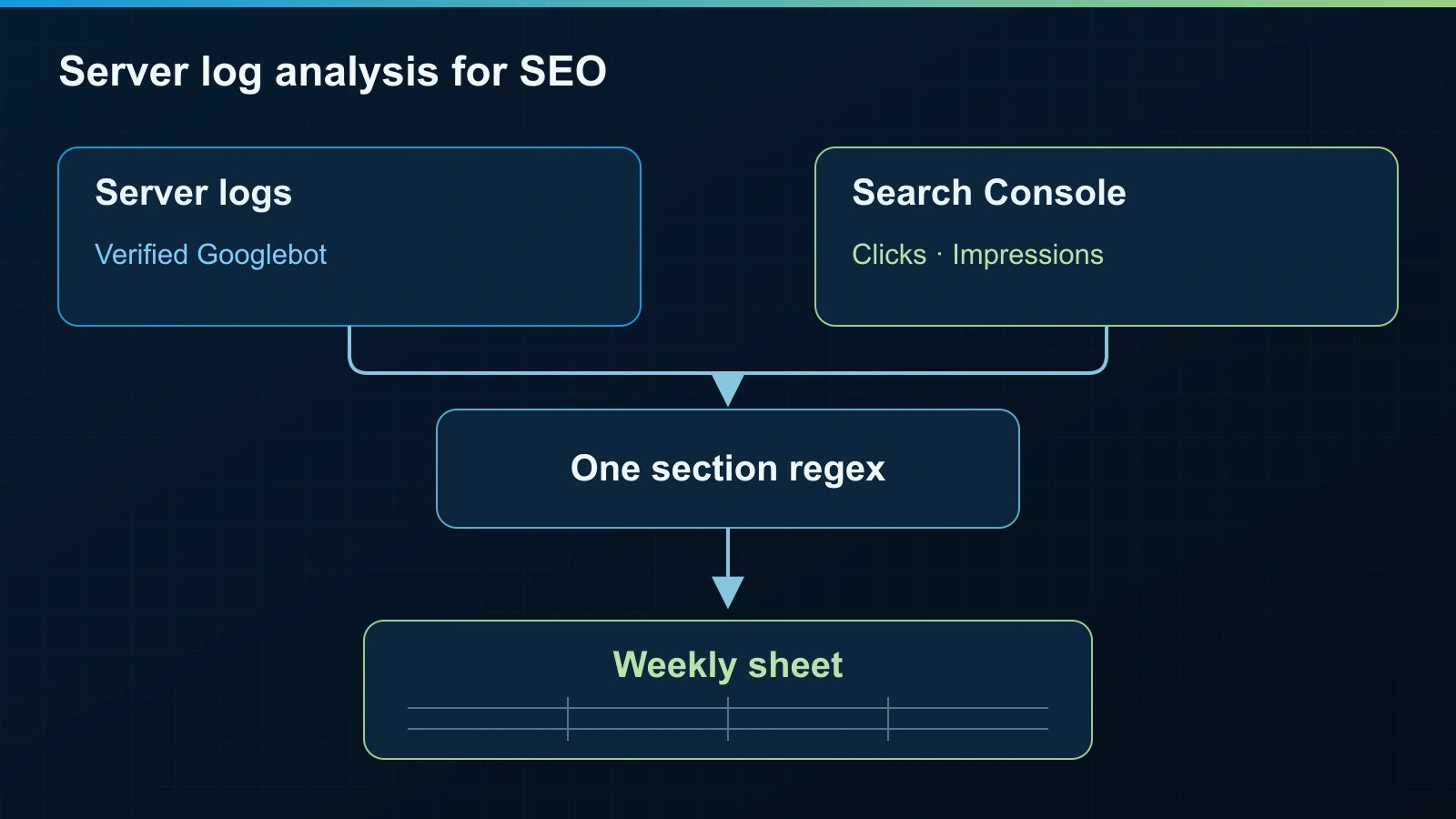
Use one section rule. Apply the same path regex to log URLs and GSC page URLs. Keep the section definition identical in both sources. Grouping logs by one directory and clicks by a wider template creates a comparison you cannot interpret cleanly.
Build weekly rows. Count verified Googlebot HTML requests returning 200 by section. Keep 3xx, 4xx, 5xx and resource requests in separate columns. Separate smartphone and desktop Googlebot where available. Use the same weekdays each week.
From GSC Performance, use Web clicks and impressions by page, mapped with that same regex. Calculate section CTR from section clicks and impressions. Align dates and the GSC country filter. Do not describe geographically unfiltered logs as country-specific crawl activity.
Write the country scope beside the comparison so the report makes that limitation visible. The same section label should mean the same set of paths throughout the sheet, the matrix and the client report.
Compare four to eight weeks before and after the change. Add the same period last year when seasonality matters. Keep technical follow-up in your indexation and crawlability playbook.
This sheet starts with column names only. Populate it with your own verified exports.
| Week | Section regex | Country scope | Googlebot HTML 200 hits | 3xx | 4xx | 5xx | Resource requests | Smartphone hits | Desktop hits | GSC Web impressions | GSC Web clicks | CTR | AI impressions, included in Web | Landing-page leads |
|---|
The diagnostic matrix
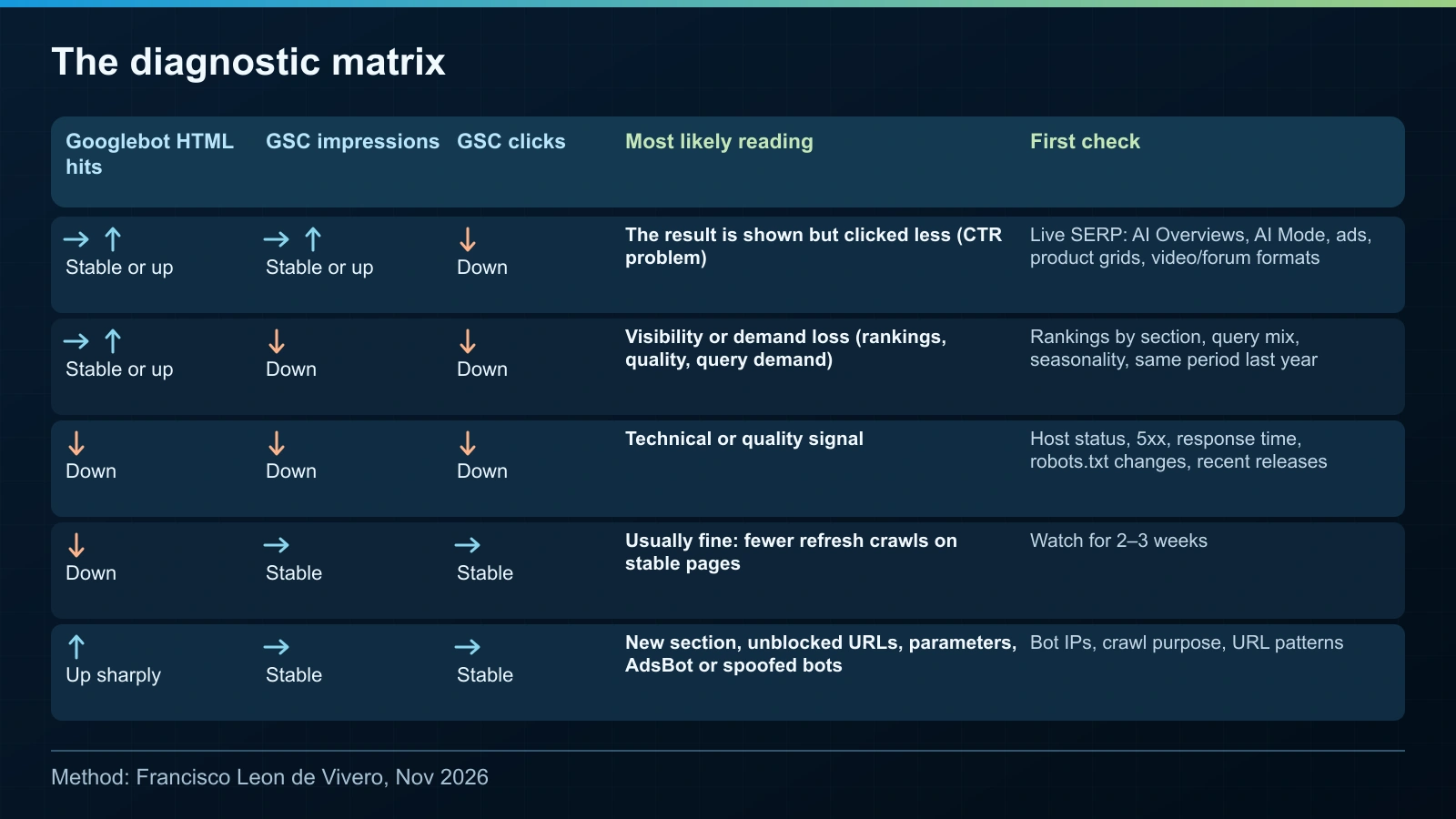
I use this matrix to choose the first investigation. These are likely readings, not findings of causation or Google guidance.
| Googlebot HTML hits | GSC impressions | GSC clicks | Most likely reading | First check |
|---|---|---|---|---|
| Stable or up | Stable or up | Down | The result is shown but clicked less (CTR problem) | Live SERP: AI Overviews, AI Mode, ads, product grids, video/forum formats |
| Stable or up | Down | Down | Visibility or demand loss (rankings, quality, query demand) | Rankings by section, query mix, seasonality, same period last year |
| Down | Down | Down | Technical or quality signal | Host status, 5xx, response time, robots.txt changes, recent releases |
| Down | Stable | Stable | Usually fine: fewer refresh crawls on stable pages | Watch for 2 to 3 weeks |
| Up sharply | Stable | Stable | New section, unblocked URLs, parameters, AdsBot or spoofed bots | Bot IPs, crawl purpose, URL patterns |
First row: impressions hold while clicks fall. Inspect the result's surroundings before assigning the loss to a feature.
Second row: fewer impressions change the investigation. Check rankings, query mix and seasonal demand by section.
Third row: open Crawl Stats and the release history. Rule out access and server problems before moving to quality explanations.
Fourth row: fewer refresh requests with steady impressions and clicks usually need observation, not urgent intervention.
Fifth row: identify the additional requests. AdsBot or spoofed bots indicate contamination in the starting count. Neither belongs in verified Googlebot totals.
Expert Insight | Francisco Leon de Vivero
I treat crawl as Google's demand for the content and clicks as users' demand for the result. The gap tells me which team should investigate first. It does not settle the cause.
Check the SERP when crawl holds and clicks drop
Take 20 to 30 top queries from the affected section. Check them manually, logged out, in the relevant country and device. Save dated screenshots and record the location of your page's first organic result.
Record AI Overviews, whether AI Mode is offered, ads above the result, product grids, and video or forum formats. Compare with screenshots or SERP-feature records from before the drop where available. Today's layout alone cannot establish what changed.
Google says AI Overviews often do not trigger, appearing when its systems consider them additive to classic Search. They also vary between checks. Use AI Overviews tracking for repeated observation, and AI Mode ads and organic visibility when documenting the surrounding layout.
The Search Console AI report provides impressions only, with no clicks or queries. Google says those impressions are already inside Web totals, so never add them.
As an aside, Gary Illyes said there was nothing to announce about more reporting data. Do not build a client report around clicks arriving there.
Report the evidence without blaming AI prematurely
Give each section a matrix row. State what happened to crawl, impressions and clicks, then attach the SERP observations. Keep the interpretation separate from the measurements.
List what you actually ruled out: technical failures, ranking changes or seasonality, where your evidence supports that conclusion. An unchecked factor remains open. Show leads or conversions per landing page beside clicks so the report includes business outcomes.
Record the unknowns: no AI-report clicks, no separate AI click attribution in GSC, and variation between SERP checks. AI citation drift is another reason to repeat observations: AI visibility moves day to day, so one check is not evidence of a persistent change.
Reddit itself named two hypotheses without splitting their contributions. Keep that restraint in your reporting. Assign the next check to the relevant team rather than presenting a suspected cause as resolved.
A short weekly checklist
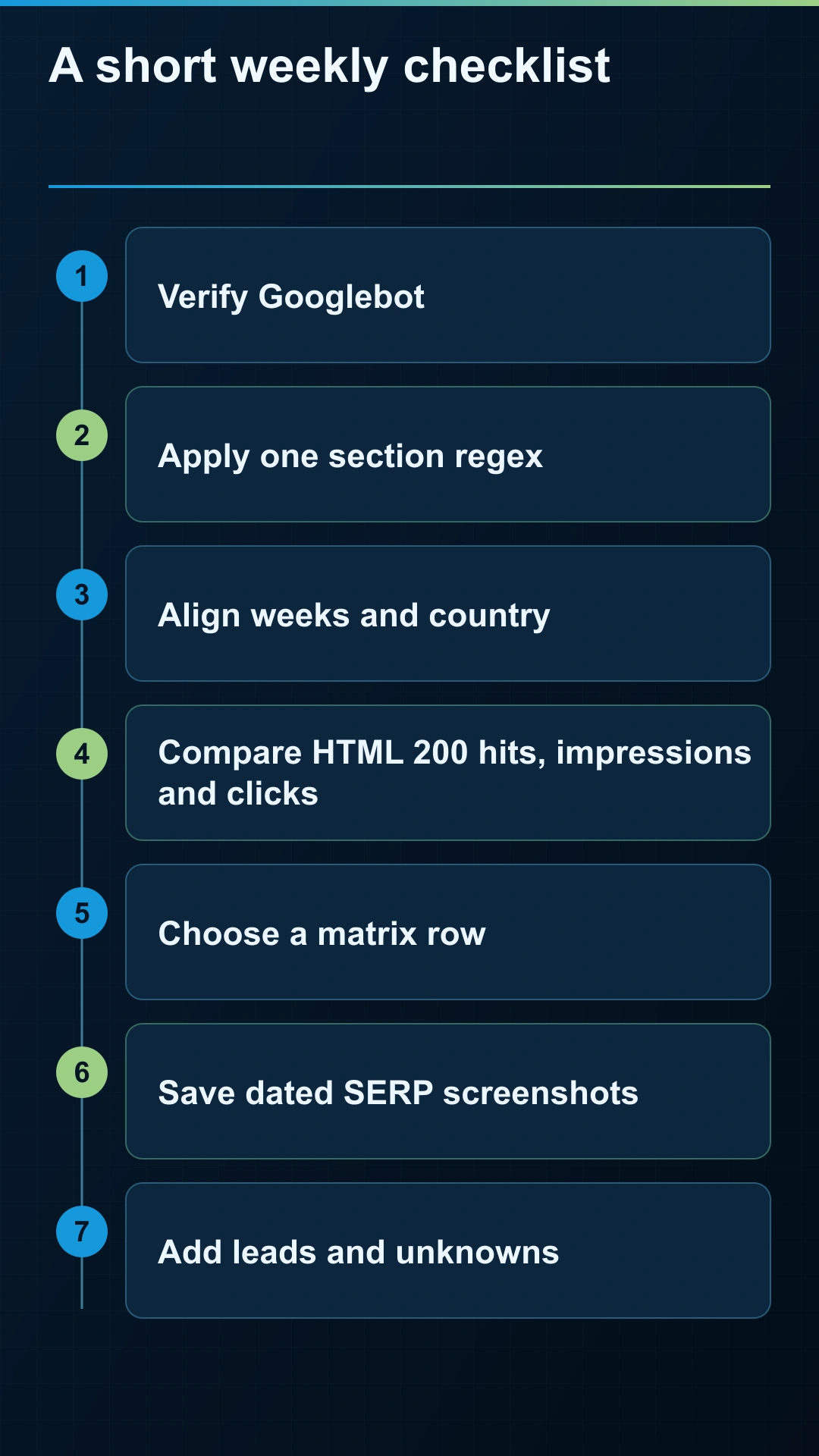
- Verify Googlebot and separate responses and resources.
- Apply one section regex to both datasets.
- Align weeks, dates and country scope.
- Compare HTML 200 hits, impressions, clicks and CTR.
- Choose the matrix row and perform its first check.
- Save dated SERP screenshots and revisit variable features.
- Add landing-page leads, remaining unknowns and the next owner.
FAQ
Why is Googlebot crawling but my traffic is dropping?
Crawling and referrals measure different activity. Compare impressions and clicks by section: steady impressions suggest a CTR investigation, while falling impressions require checking visibility and query demand too.
Does more crawling mean better rankings?
More requests do not establish better rankings. New URLs, unblocked sections or extra refresh activity need interpretation alongside impressions and clicks.
How do I verify that a hit is really Googlebot?
Use reverse DNS followed by forward DNS confirming the original IP, or match Google's published crawler IP lists. A Googlebot user agent alone is insufficient.
Should I use server logs or the Crawl Stats report?
Use logs for verified requests and section grouping. Use Crawl Stats for Google's crawl history and host diagnostics. Google acknowledges small differences between the sources.
Are AI Overviews to blame for my click drop?
They are a hypothesis to test against query-level SERP observations. Check ads, other formats, rankings and seasonality too. Stable crawling does not establish AI attribution.
Can Search Console show clicks from AI Overviews?
Those clicks are included in Performance under Web, but Google does not split AI clicks out. The generative AI report shows impressions without clicks or queries.
Crawl activity does not establish why clicks fell. Keep the cause open until the evidence supports it.
Growing Search can help review the section-level evidence through an SEO audit or technical SEO advisory, then define the next investigation with your team.
About the Author