Should You Opt Out of Google AI Overviews? What the Halo Effect Means for Organic Clicks
A small opt-out test saw organic clicks drop too. What each Google AI control blocks, the limits of the data and how to test it on a few pages first.

You see your content in an AI answer and reach for the switch. You can now opt out of AI Overviews and AI Mode through an official Search Console setting, but the one public test discussed here saw regular organic clicks fall too. For most sites, my answer today is: not sitewide, test first.
That is a recommendation as of October 30, 2026, not a prediction for your site. Cyrus Shepard's small case study raises a useful question: could appearing in an AI answer help someone choose your classic result too?
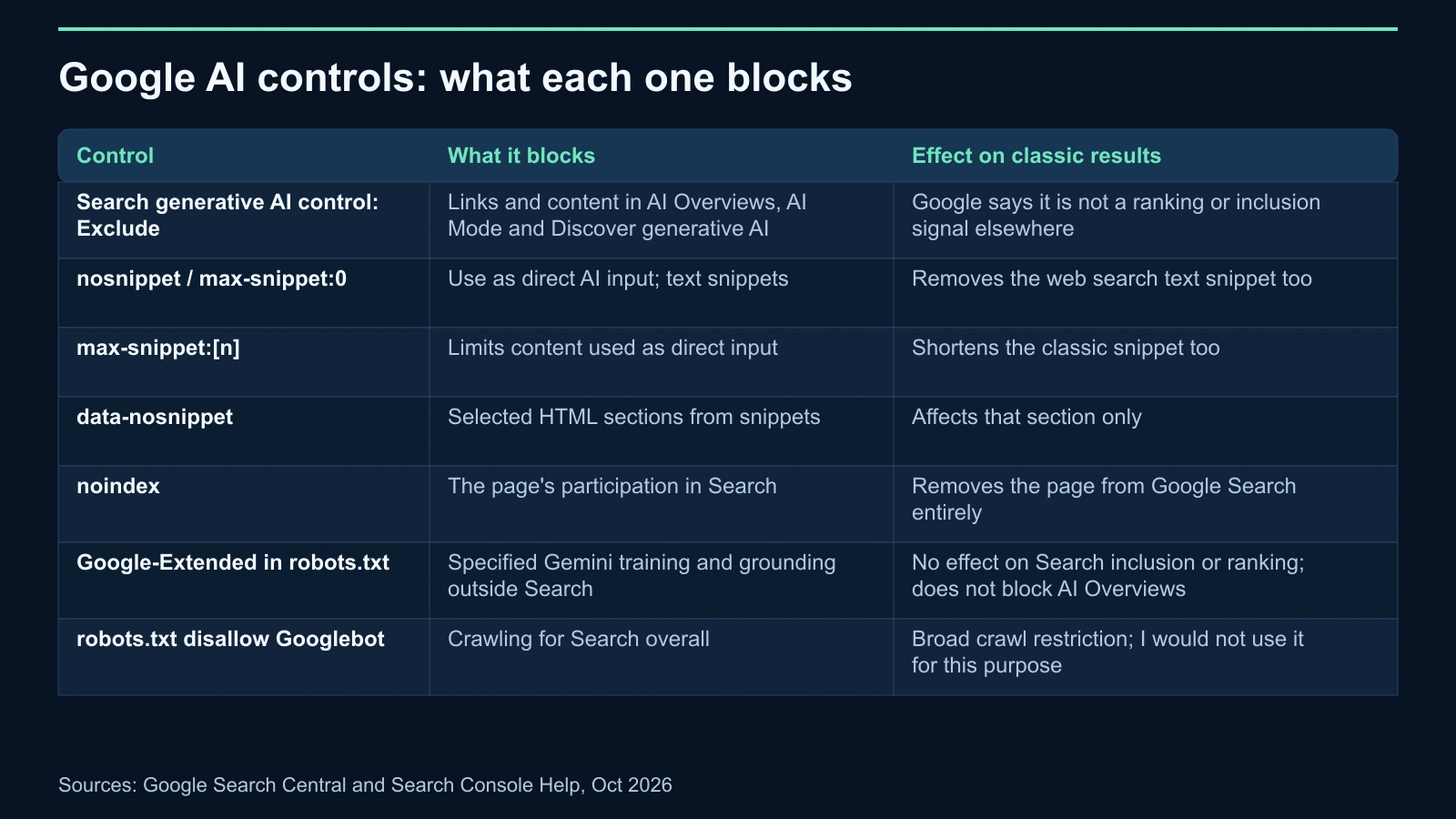
First, separate the controls. Some remove AI participation; others also change what searchers see in classic results.
| Control | What it blocks | Effect on classic results |
|---|---|---|
| Search generative AI control: Exclude | Links and content in AI Overviews, AI Mode and Discover generative AI | Google says it is not a ranking or inclusion signal elsewhere |
| nosnippet / max-snippet:0 | Use as direct AI input; text snippets | Removes the web search text snippet too |
| max-snippet:[n] | Limits content used as direct input | Shortens the classic snippet too |
| data-nosnippet | Selected HTML sections from snippets | Affects that section only |
| noindex | The page's participation in Search | Removes the page from Google Search entirely |
| Google-Extended in robots.txt | Specified Gemini training and grounding outside Search | No effect on Search inclusion or ranking; does not block AI Overviews |
| robots.txt disallow Googlebot | Crawling for Search overall | Broad crawl restriction; I would not use it for this purpose |
The controls available when you opt out of AI Overviews
The Search generative AI control lives in Search Console → Settings → Search generative AI. According to Search Console Help, it became available worldwide on August 31, 2026.
It offers three options: Include my site's links and content (default), Exclude my site's links and content, and Inherit control from parent. Exclusion removes links and content from the covered features, including their use as input to generate responses. Those features include AI Overviews, AI Mode and generative AI in Discover.
Google says excluded sites receive no traffic or impressions from those features. It also says the setting is not used as a ranking or inclusion signal affecting other parts of Search. The Google announcement makes the same distinction for results outside generative AI Search.
This control does not affect AI training or override Merchant Center and Google Ads participation. Content may still help power Search as a whole, such as understanding query language. Exclusion is not a request to remove the site from Google's entire system.
The setting works by Search Console property. A child URL-prefix property or subdomain can inherit its parent's choice or override it; top-level domain owners receive a notification about child overrides. That makes a folder test possible when the folder has its own URL-prefix property.
Google describes application as generally taking a few days, with content excluded within 1–2 days after the control goes live. Caching and propagation can make some content take longer. Treat that as guidance, not an exact deadline.
The alternatives have different consequences. The robots meta specification says nosnippet prevents text snippets and use as direct input for AI Overviews and AI Mode. max-snippet:0 means the same thing; max-snippet:[n] limits snippet length and how much content can become direct input. Separately granted permissions can be exceptions to that limit.
My practical reading: nosnippet and max-snippet are not AI-only switches. They change the blue-link snippet too. With conflicting rules, the more restrictive one applies.
data-nosnippet excludes selected content within valid span, div or section elements from snippets. Check the HTML: an unclosed div can include everything after it. noindex goes further still, removing the page from Search.
The AI features documentation lists these controls and says supporting links must be indexed and eligible for a snippet. For context, see how Google AI Overviews work.
Finally, Google-Extended controls specified Gemini training and grounding outside Search. It does not remove your site from AI Overviews or AI Mode. Blocking Googlebot in robots.txt restricts Search crawling overall; I would not recommend it as an AI opt-out.
What Cyrus Shepard measured, and what remains unknown
Barry Schwartz covered Shepard's case study in Search Engine Roundtable on October 30. The quotes below come through that coverage, rather than a direct reading of Shepard's LinkedIn post.
Shepard reported that AI impressions immediately reached zero. He also reported an estimated AI-impression CTR of about 0.9%, derived from overall before-and-after click data. In his clarification to Barry, he described it as:
“calculated by looking at overall site CTR + impressions and subtracting known AI impressions during the experiment period.”
That is an estimate, not a directly reported AI click metric. AI impressions represented about 8% of total impressions, and overall impressions dropped. The surprising observation was:
“most surprisingly, regular organic clicks ALSO DROPPED when AI features were disabled.”
Average position did not provide a simple explanation. Shepard said sitewide average position increased because of new posts and brand search, while the individual URLs with the most AI visibility showed a drop and then a rise when visibility returned.
He also clarified something essential: AI Overviews appeared before, during and after the experiment. His site appeared in them before and after, but not during. This was not a comparison of SERPs with AI Overviews against SERPs without them.
Search Engine Land's October 29 report says he disclosed no traffic volume, test dates, size of the organic click decline or opt-out method. That leaves one small site with important details unavailable. It cannot establish the effect for publishers generally, let alone predict your business outcome.
There is also a reversal concern. In his October 1 Substack note, Shepard said AI visibility returned much more slowly than it disappeared. He did not establish a recovery timetable you can use for planning.
Why classic organic clicks might fall: the halo hypothesis
Shepard's proposed explanation, quoted via Search Engine Roundtable, was:
“So earning an AI citation link/mention may influence higher clicks anywhere on the SERP, even regular organic results further down the page.”
He calls this a possible Search SERP Halo Effect. The hypothesis is simple: seeing a brand in an AI answer may make someone more likely to select that brand elsewhere on the page.
Greg Sterling of Near Media commented that their research had observed brand lift or awareness translating into subsequent searches and clicks, though inconsistently. That supports considering the mechanism. It does not prove that the mechanism caused this site's decline.
Google's statement about ranking signals does not contradict falling clicks. A control can leave ranking treatment unchanged while removing an appearance that influences user choice. That distinction is my reading of the evidence, not Google's explanation of the test.
I would connect this to AI Overviews and brand search, while keeping the causal claim open. The available information cannot separate a halo effect from every other possible influence.
Expert Insight: Francisco
I'd avoid deciding on a sitewide opt-out from estimated AI referral traffic alone. An AI citation may matter beyond its direct click, and the AI report itself gives you impressions, not clicks. Measure the business outcome before pricing that visibility at zero.
How I'd test before changing the whole site
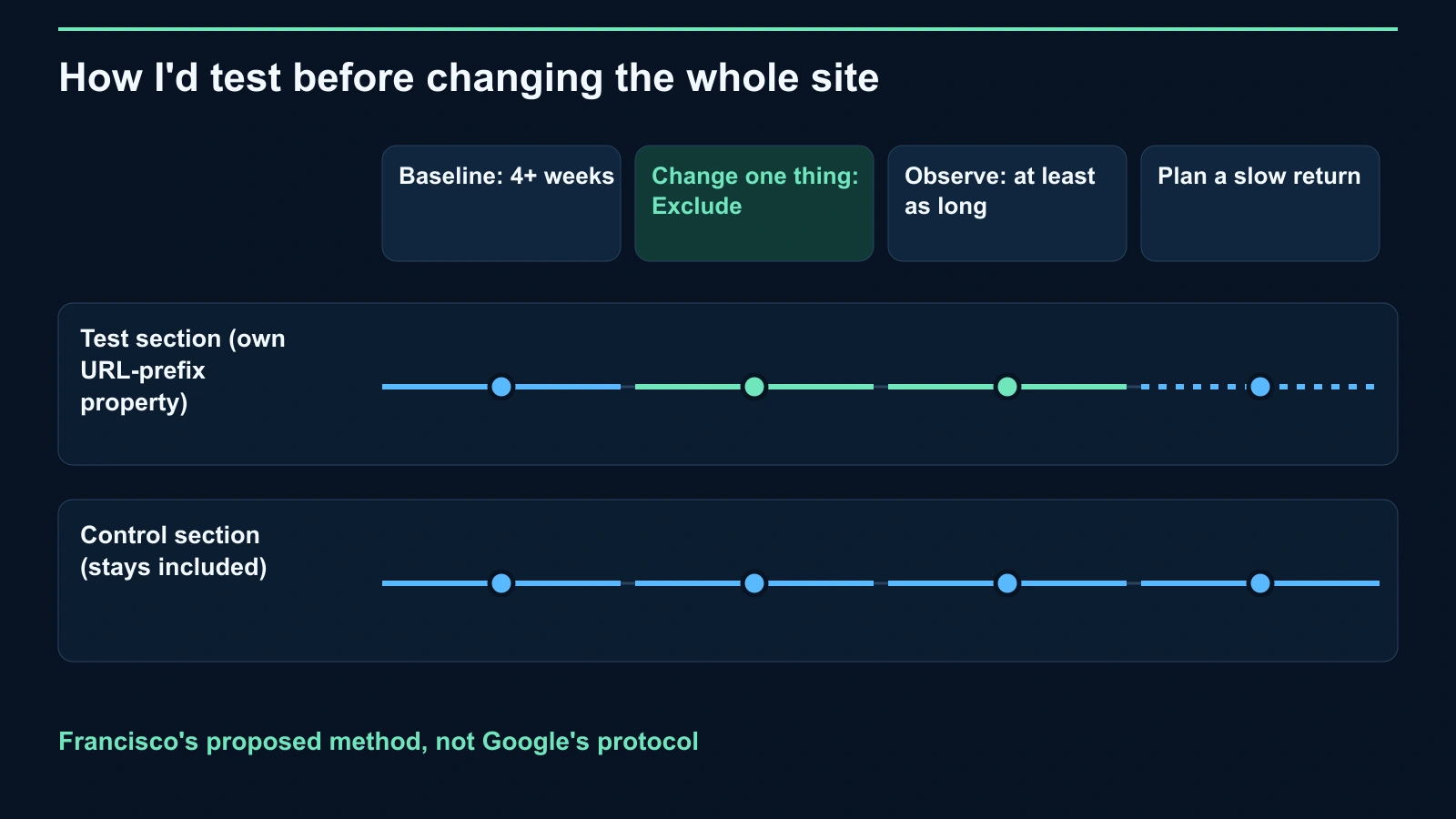
This is Francisco's proposed method, not Google's testing protocol. Its purpose is to make your decision more useful while limiting the scope of the change.
- Choose a section with its own URL-prefix property. Verify the property boundary and inheritance setting. Keep the first change confined to that section.
- Keep a comparable section included. Record which URLs belong to the test and control groups before starting. Choose the comparison deliberately rather than after seeing results.
- Record at least four weeks of baseline data. Save AI impressions, organic clicks, CTR, URL position, branded demand and conversions for both groups.
- Change one thing. Apply the exclusion to the test property and record the date. Avoid combining it with snippet changes or content work that would make interpretation harder.
- Observe for at least the same length of time. Compare both groups with their own baselines and each other. Confirm exclusion in the AI impressions data instead of assuming the setting applied instantly.
- Plan for a slow return. Decide beforehand what would justify restoring inclusion. Leave room for visibility to return more slowly than it left, without assuming Shepard's experience sets your recovery time.
A comparison group improves the question you can ask; it does not remove every uncertainty. If both groups move together, I would be cautious about crediting the switch for the movement.
What to measure in Search Console beyond impressions
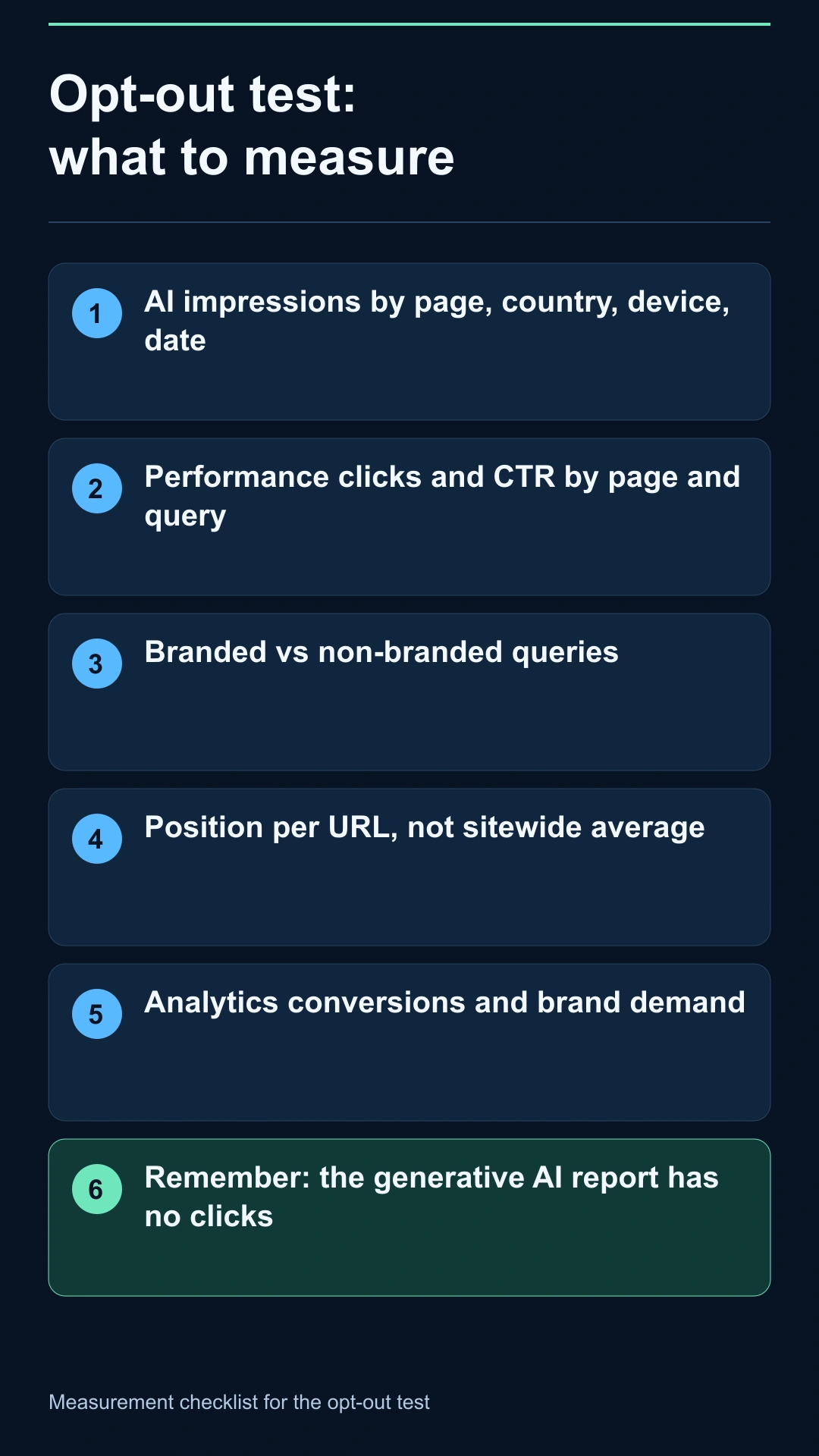
The Generative AI performance report shows AI Overviews and AI Mode impressions. Google's report documentation lists page, country, device and date dimensions. Do not treat it as a source of AI clicks or queries.
Use it to check whether the test section lost AI visibility. Watch aggregation: the chart groups by property, while the page table groups by page, so totals can differ. Dates use Pacific Time.
Then use the standard Performance report to compare clicks and CTR by page and query for both groups. Google includes AI-feature traffic within its Web search reporting, so those totals are not an independent AI-click breakdown.
Separate branded and non-branded queries. Check position per URL instead of relying on the sitewide average that obscured part of Shepard's story. Review conversions in analytics and brand search volume alongside the Search Console results.
My decision rule would start with the business question: did removing participation improve the outcome you care about, after considering the control group? Fewer impressions alone confirm less exposure. They do not establish a better outcome.
This reporting gap is also why I support the push for better AI webmaster data. Useful controls deserve measurements that help owners assess their consequences.
When I think opting out makes sense
This is my opinion, not a conclusion established by Shepard's test. I would consider exclusion for licensed or paid content where AI answers substitute for the product, sensitive or regulated pages where summaries can misstate information, and legal or contractual requirements.
Match the control to the problem. For a narrow content issue, consider data-nosnippet or max-snippet, remembering their effects on classic snippets. For a broad participation issue, the property control offers a more direct boundary.
Also check what exclusion cannot accomplish. Search Console Help says other sites' content can still appear and may look similar to yours. Removing your contribution does not remove the answer format or the subject matter.
FAQ
How do I opt out of AI Overviews?
Open Search Console → Settings → Search generative AI and select “Exclude my site's links and content” for the intended property. The control also covers AI Mode and Discover generative AI.
Does opting out hurt my rankings?
Google says the setting is not a ranking or inclusion signal elsewhere in Search. Shepard observed fewer organic clicks, which does not establish that exclusion caused a ranking penalty.
Does Google-Extended remove my site from AI Overviews?
No. It controls specified Gemini training and grounding outside Search. Google says it does not affect Search inclusion or ranking.
Does nosnippet only affect AI Overviews?
No. It removes the classic text snippet too, and prevents use as direct input for AI Overviews and AI Mode. max-snippet:0 is equivalent.
How long does exclusion take, and how quickly can I reverse it?
Google generally says a few days, including 1–2 days after the control goes live, with exceptions. Shepard reported a slower return after rejoining; that observation gives no fixed recovery deadline.
Can I exclude only part of my site?
Yes. A child URL-prefix property can override its parent, allowing a folder-level setting. Page and section snippet controls offer narrower choices with their own consequences.
One small test is a reason to measure carefully, not a verdict for every site.
Growing Search can help you set up the comparison and read the results through an SEO audit.
About the Author