Search Console Regex for Long Queries and AI Prompt Ideas
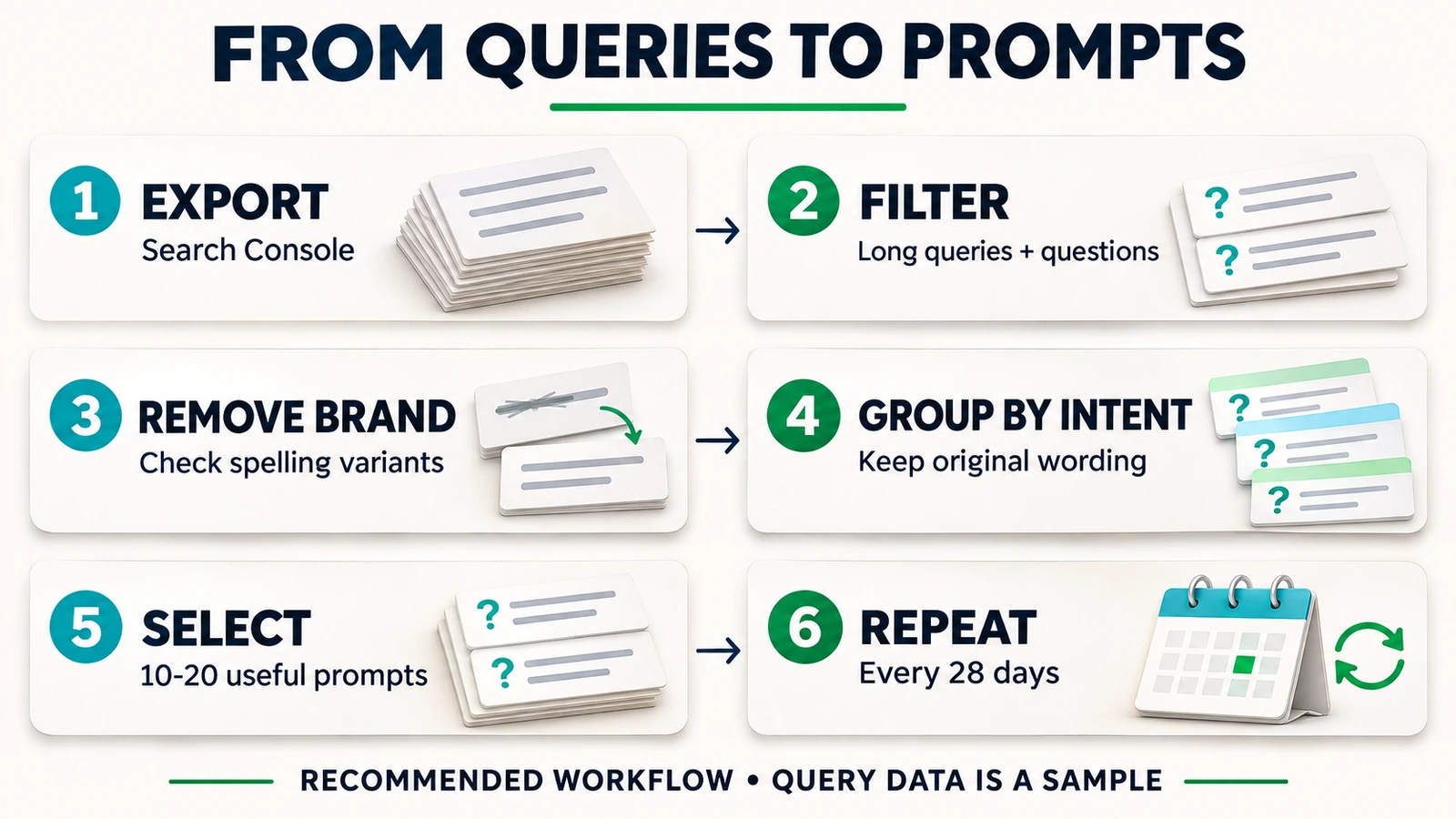
Use an anchored regex in the Search Console Queries report to find searches with at least 8 whitespace-separated words. Review non-brand questions and buying intent before choosing prompts. The export samples Google demand and does not reveal AI conversations.

Build an AI-search prompt panel from questions visible in customer demand before inventing a list from a keyword alone. Search Console queries can include the problem a person needs to solve and the constraint behind a purchase. Filtering for that detail gives the selection a traceable starting point, even though the report cannot reveal every question.
Long and question-form queries are among the closest public signals to a prompt available through this report. That is an editorial judgment about their usefulness, rather than a Google statement about how users interact with AI. A long query can still be irrelevant to the business, and a short price search can deserve a place in the panel.
TLDR. Start with an anchored 8-word filter, inspect question and comparison language, then remove branded searches. Keep the original query beside any rewrite. As practitioner guidance, select 10-20 useful prompts and repeat the checks every 28 days. Treat the list as a sample of observed Google demand.
Google query evidence and the AI-search boundary
Search Console does not show prompts submitted to ChatGPT or Perplexity. It also does not provide a separate set of AI Mode conversation rows in the Web Performance query export. Use the report to choose candidate wording, then measure responses in those products separately.
Google says AI Overviews and AI Mode may use query fan-out, issuing related searches across subtopics and data sources. Traffic from those features is included in the Performance report's Web search type. These facts explain why a Google query list is relevant to an AI-search investigation, but they do not identify an exported query as an AI prompt or reconstruct an answer's internal searches.
Preserve that boundary in the working sheet. One column contains the query observed in Google. Another contains the proposed prompt for testing. A rewritten question gains context from an editor, so it should remain distinguishable from the source wording.
I would keep the original Search Console query beside every rewritten prompt, so the next review can distinguish observed demand from added context.
How to filter long queries in Search Console
Open the relevant property and the Performance report for Search results. Select Web as the search type. Choose 28 complete days as a practical starting window, or the longest stable window if useful questions are scarce. Record the dates and any country or device restriction so the next export can use a comparable scope.
- Select the Queries tab to inspect the query table.
- Choose + Add filter, then Query and Custom (regex).
- Select Matches regex for an inclusion, or Doesn't match regex for an exclusion.
- Paste the expression and apply it. Read the returned rows before exporting them.
These are the documented query-filter controls. To find searches containing at least 8 whitespace-separated words, use Matches regex with this exact pattern:
^(?:\S+\s+){7,}\S+$
Read it in pieces:
^starts at the beginning of the query.\S+reads one or more non-whitespace characters, treated here as one word.\s+reads the whitespace after that word.(?:...)groups the word and whitespace without capturing them.{7,}requires at least 7 repetitions of that group.- The last
\S+adds the final word, and$requires the end of the query.
Seven word-and-space groups followed by a final word give a minimum of 8. This counts tokens separated by whitespace, not characters or meaning. Punctuation attached to a word remains part of that token. Leading or trailing whitespace will fail this exact anchored expression, so trim exported text when applying it in a separate tool.
Eight words is a screening choice, without a claim that this length proves commercial intent. Keep shorter comparisons or price questions in consideration through separate exports.
Question, buying and combined regex patterns
Run the following screens separately to see which useful candidates each contributes. A starter or buying term is a reason to read a query, rather than automatic proof of its intent.
English question starters
^(who|what|which|when|where|why|how|can|should|is|are|does|do)\s
The caret places the selected starter at the beginning. Parentheses group the alternatives, | means “or,” and \s requires a following whitespace character. A query with “how” in the middle does not qualify. There is no end anchor because the rest of the question can continue after the starter.
Spanish question starters
^(qué|que|quién|quien|cómo|como|cuál|cual|cuáles|cuales|cuánto|cuanto|cuánta|cuanta|dónde|donde|cuándo|cuando|por qué|por que|puedo|se puede|es|son|vale la pena)\s
This uses the same start-and-whitespace structure, with accented and unaccented variants listed explicitly. It includes phrases such as “por qué” and “vale la pena.” A leading ¿ is outside the tested pattern and prevents a match, so inspect punctuation variants separately. This selected vocabulary cannot capture every possible question.
English buying and comparison words
(^|\s)(best|top|vs|versus|compare|comparison|alternative|alternatives|review|reviews|cost|price|pricing)(\s|$)
The opening group allows the start or whitespace before a selected term. The closing group requires whitespace or the end after it. That allows “best” anywhere as a separate token while avoiding “top” inside a longer word. Punctuation touching the term can prevent a match, so the filter does not establish that excluded queries lack buying intent.
Spanish buying and comparison words
(^|\s)(mejor|mejores|vs|versus|comparar|comparativa|alternativa|alternativas|opiniones|precio|precios|cuesta|costo)(\s|$)
The boundaries work the same way as in the English expression. Alternatives such as “precio” and “comparativa” help surface different decisions. Read the whole query before assigning a service or purchase-stage label.
A question starter and at least 8 words in one filter
For English, use this single combined expression:
^(who|what|which|when|where|why|how|can|should|is|are|does|do)\s(?:\S+\s+){6,}\S+$
After the one-word starter and its whitespace, at least 6 word-and-space groups plus a final word produce at least 7 more words. The anchors require the complete query to fit that structure.
The tested Spanish combined expression is:
^(qué|que|quién|quien|cómo|como|cuál|cual|cuáles|cuales|cuánto|cuanto|dónde|donde|cuándo|cuando|por qué|por que|puedo|se puede|vale la pena)\s(?:\S+\s+){6,}\S+$
A one-word Spanish starter gives the same minimum of 8. Multiword starters raise it, so “por qué” requires at least 9 words and “vale la pena” at least 10. This combined vocabulary also omits some terms from the starter-only filter, including “es” and “son.” Treat it as a narrower screen, rather than an exact intersection of the two earlier lists.
RE2 rules behind the filters
Search Console uses partial matching unless ^ or $ restrict the match to a boundary. Matching is case-insensitive by default, so these UI patterns need no added case flag. The length expression uses both anchors because its test concerns the complete query.
RE2 does not support lookahead or lookbehind. Use Doesn't match regex for an exclusion rather than a negative lookahead copied from another regex engine. Also avoid \b beside accented Spanish letters. RE2's word boundary is ASCII-based, while the explicit whitespace boundaries above avoid depending on how an accented letter meets that boundary.
API regex filters and export limits
For a repeatable larger extraction, the Search Analytics API accepts includingRegex and excludingRegex on the query dimension. This short request combines the same length pattern with a fictional brand exclusion. Replace the date placeholders with the chosen YYYY-MM-DD values and replace the brand variants before sending it.
{
  "startDate": "START_DATE",
  "endDate": "END_DATE",
  "type": "web",
  "dimensions": ["query"],
  "dimensionFilterGroups": [{
    "groupType": "and",
    "filters": [
      {"dimension": "query", "operator": "includingRegex", "expression": "^(?:\\S+\\s+){7,}\\S+$"},
      {"dimension": "query", "operator": "excludingRegex", "expression": "(acme|acme corp|acmecorp|akme)"}
    ]
  }],
  "rowLimit": 25000,
  "startRow": 0
}
JSON needs doubled backslashes to encode the same regex. dimensions: ["query"] requests query rows, and groupType: "and" requires both conditions. rowLimit allows up to 25,000 rows per response. For the next page, use startRow: 25000 with the same scope, continuing until no more rows are returned. Pagination cannot recover data the service withholds.
The documented API ceiling is up to 50,000 rows per day per site per search type, which may not be reached. A date-range query with pagination should not be described as exhaustive. For extraction approaching that ceiling, plan daily requests while preserving the chosen filters.
The UI query table and standard report export stop at 1,000 rows. For a continuing reporting need beyond these limits, bulk export to BigQuery has no daily row limit. It still excludes anonymized query text and requires a Google Cloud project with billing. Usage above the free allowance is charged.
Anonymized queries and the missing-demand problem
Google describes anonymized queries as those not issued by more than a few dozen users over a 2-3-month period. Long, specific questions can be rare, so the questions this workflow seeks are particularly exposed to that privacy limit. No longer regex or larger rowLimit reveals their wording.
Anonymized queries are omitted from the query table but can contribute to unfiltered chart totals. Applying a query filter excludes them from those totals. Matching and nonmatching totals may therefore fail to add up to the unfiltered total, with data truncation another cause. Do not interpret the difference as a measured share of long queries or AI prompts.
Search Console also stores top data rows rather than every row. The export gives a sample of searches in which this site appeared, rather than a census of market demand. An empty group can mean limited visibility or unavailable query data, without proving that no one asks the question.
I would treat a missing long query as an evidence gap before concluding that nobody asks the question.
From query rows to 10-20 useful prompts
The following selection method is practitioner guidance. Its purpose is a manageable panel tied to a business decision, without a claim that Google endorses the panel size or cadence.
First remove the site's own brand from candidate queries. Use Doesn't match regex with a tested list of the business name, domain and common spelling variants. This fictional example shows the structure:
(acme|acme corp|acmecorp|akme)
This is a substring match. “Acme” can also match inside a longer word, so review excluded examples before accepting the brand list. To clean an already-filtered long-query export, apply brand removal in the sheet or use the API example above. This avoids relying on an unsupported assumption about stacking two query filters in the UI.
Group the remaining rows by service or product, then by the decision expressed. Keep a cost question separate from a suitability question or vendor comparison. Merge near-duplicates only when they call for the same answer, retaining a location or integration constraint if it changes the recommendation.
Keep the original wording unchanged in one column. Rewrite a fragment only if needed for a natural question. For an illustrative, invented example, “best accounting software for small construction companies in Canada” could become “Which accounting software suits a small construction company in Canada?” Adding an enterprise budget or a required feature absent from the query would change its meaning.
Use the keyword-to-prompt Google Sheets workflow to organize the source and proposed prompt. Keep clicks and impressions as selection context, without calling them AI-platform demand. Add the source window and a short reason for choosing each question.
I would choose the questions that could change a service or buying decision before adding another near-duplicate to the tracking list.
Pick 10-20 prompts that cover important service and buying decisions and can be checked consistently. A smaller useful set is preferable to expanding it with near-duplicates simply to reach a count. Leave branded demand in a separate analysis if it matters to another question.
Measuring answers in ChatGPT, Google and Perplexity
Run the panel in ChatGPT and Perplexity, and check Google AI Mode and AI Overviews separately. If Search shows no AI Overview, record “not shown.” That differs from an available answer that does not mention the business. The AI Overview measurement guide helps keep those observations distinct from ordinary search performance.
For each observation, record:
- The exact prompt and run date, with the product or model label available in the interface.
- Sign-in state, language and location context, plus any condition that changed.
- Whether the business was mentioned and which exact URL, if any, was cited.
- Competitors named, with their cited URLs where present.
- The saved answer or excerpt, so later checks can identify answer drift in recommendations or sources.
Use the same logged-out and location context where possible. If sign-in is required or location cannot be controlled, record the exception. These steps reduce avoidable variation without making the responses deterministic. The prompt-tracker guide explains why repeated answers remain observations of a sample, rather than a stable AI ranking or a platform-wide visibility measure.
Repeat every 28 days as a practical operating cadence. Refresh the candidate list from the next comparable Search Console export while keeping a stable core panel. Version replacements separately, since changing the question can change the answer. A mention or citation does not establish a visit, lead or sale, and an answer change alone cannot establish the effect of a website edit.
Prompt-panel checklist and common mistakes
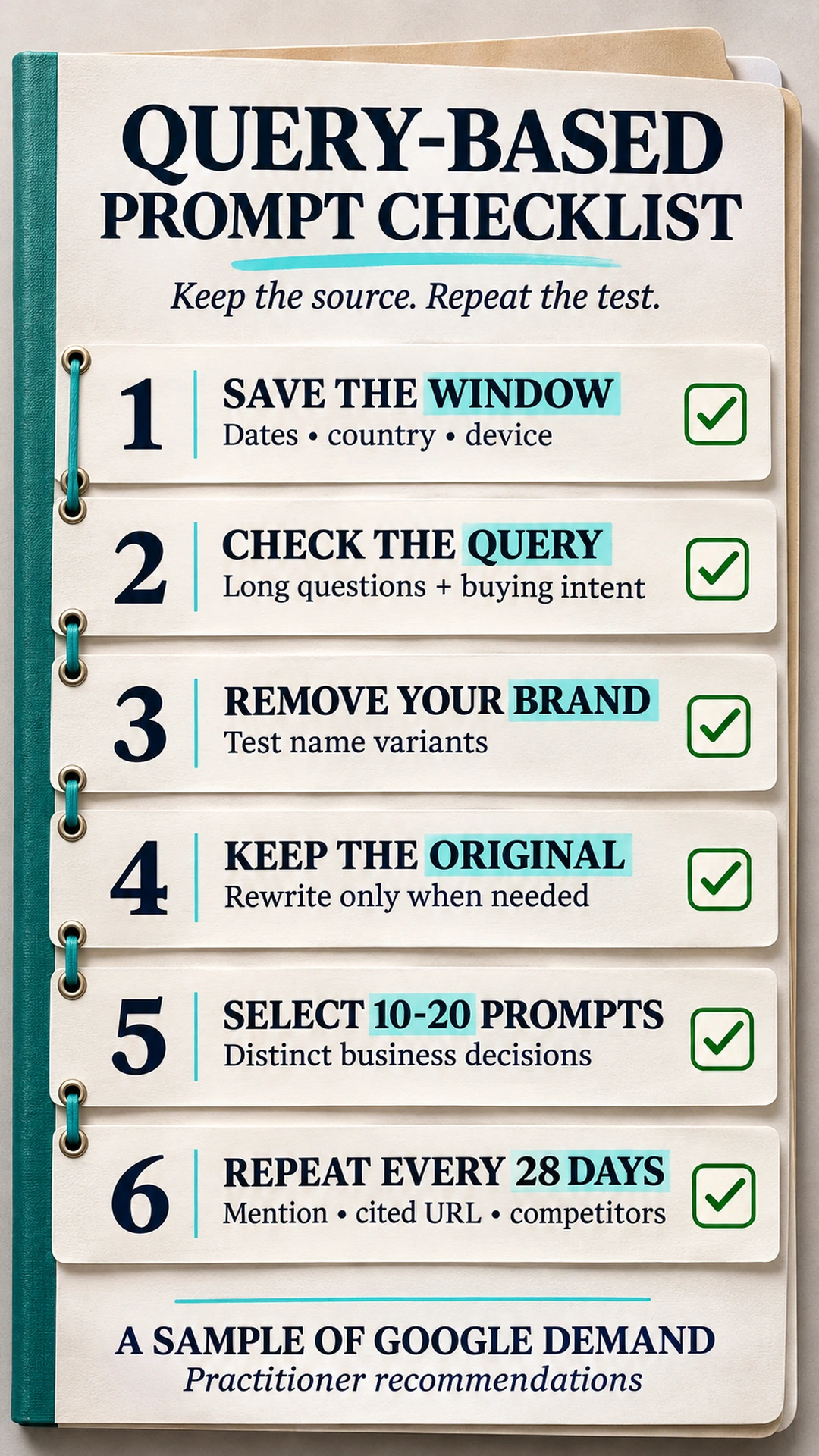
Before the next round, check the failure that would change the interpretation:
- Missing anchors. Keep
^and$in the length pattern so the full query must fit the word-count structure. - Unsupported lookaround. RE2 rejects lookahead and lookbehind. Use the documented exclusion control.
- An allegedly complete list. Preserve the privacy and export limits beside the sample, even after API paging.
- Branded prompts in a discovery panel. Remove the site's name before evaluating unprompted mentions, and review substring exclusions.
- Too many similar prompts. Select distinct buying decisions the team can repeat instead of inflating the list.
- Different windows or contexts. Keep the export scope and core questions comparable, documenting changed prompts or product conditions separately.
Frequently asked questions
Does Search Console show ChatGPT or Perplexity prompts?
No. It reports Google Search performance, not prompts submitted to ChatGPT or Perplexity. Its visible queries can supply wording for a separate AI-search prompt panel, but they do not identify an AI conversation.
Which regex finds queries with 8 or more words?
Use ^(?:\S+\s+){7,}\S+$ with Matches regex. It requires at least 8 whitespace-separated tokens and anchors the complete query. Length alone does not establish buying intent.
Why do query-filtered totals differ from the unfiltered total?
Anonymized queries can contribute to unfiltered chart totals but are excluded when a query filter is applied. Data truncation can also prevent matching and nonmatching totals from adding to the original total.
Can lookahead remove branded queries in Search Console?
No. Search Console uses RE2, which does not support lookahead or lookbehind. Use Doesn't match regex in the UI or excludingRegex in the API, and test the actual brand variants against query examples.
Does an API or BigQuery export reveal every query?
No. The API has row limits and returns top data. Bulk export to BigQuery avoids the daily row limit, but still excludes anonymized query text and requires a Google Cloud project with billing.
How many prompts should the panel contain?
Start with 10-20 useful prompts as practitioner guidance, then repeat them every 28 days under comparable conditions. Keep original queries beside rewrites and version any changes to the core panel.
About the Author