I Built a Technical SEO Auditor Skill for Claude AI
A practical Claude skill for technical SEO audits that turns HTML, crawl exports, GSC data, and URL Inspection evidence into prioritized consultant-style findings.

Technical SEO Auditor Skill Walkthrough
Watch the Full Video Before You Read
A practical walkthrough of how the Claude skill turns technical SEO evidence into consultant-style audit findings, priorities, validation steps, and a 30-day action plan.
I Built a Technical SEO Auditor Skill for Claude AI
TL;DR: I built a downloadable Technical SEO Auditor skill for Claude AI so technical audits stop turning into vague checklist dumps. The skill asks Claude to review real evidence, separate confirmed issues from hypotheses, prioritize fixes by search impact, and return a consultant-style audit that a developer, SEO lead, or founder can act on.
You can download the skill here: Technical SEO Auditor Skill for Claude. If you want the packaged version or a walkthrough, comment Skill on the post where I shared it and I will send it over.
Most AI-assisted technical SEO audits fail for the same reason most human checklist audits fail: they treat every possible issue as equally important. A missing alt attribute, a blocked canonical page, and a rendered HTML mismatch should not land in the same priority bucket.
The point of this skill is simple. Claude should act like a technical SEO consultant reviewing evidence, not like a template generator filling out a generic audit. It should ask, "What is the issue, what proves it, what search system does it affect, what should we do next, and who needs to fix it?"
That is the same operating model I use in technical SEO advisory work. A good audit is not a list of defects. It is a decision system.
Why Checklist Audits Fail
Checklist audits are useful for coverage. They are weak for judgment.
A crawler can tell you that 2,000 pages have duplicate titles. It cannot always tell you whether those pages matter, whether Google indexes them, whether they receive impressions, whether they are faceted URLs that should be consolidated, or whether the duplicate pattern is a symptom of a larger template problem.
That is where many AI outputs get dangerous. If you paste a crawl export and ask, "What are the technical SEO issues?", Claude can produce a long report that looks polished but lacks evidence hierarchy. It may overstate minor items, miss the money-page risk, or recommend work that burns developer time without moving rankings, crawl efficiency, or conversions.
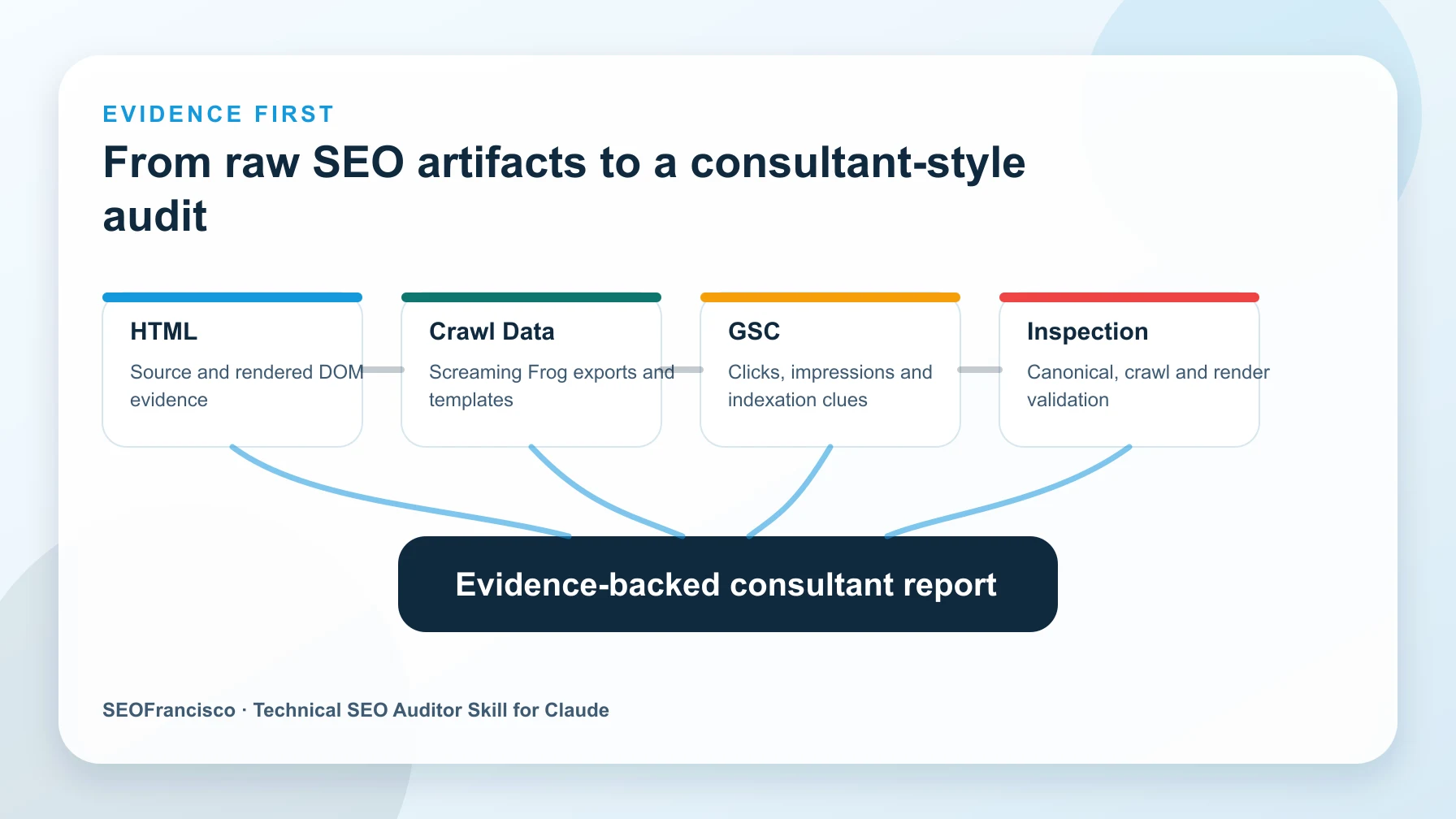
The skill is built to push against that behavior. It forces the audit to start from inputs, classify confidence, and tie recommendations to search impact.
What the Skill Audits
The skill is designed around ten technical SEO areas that come up again and again in real audits.
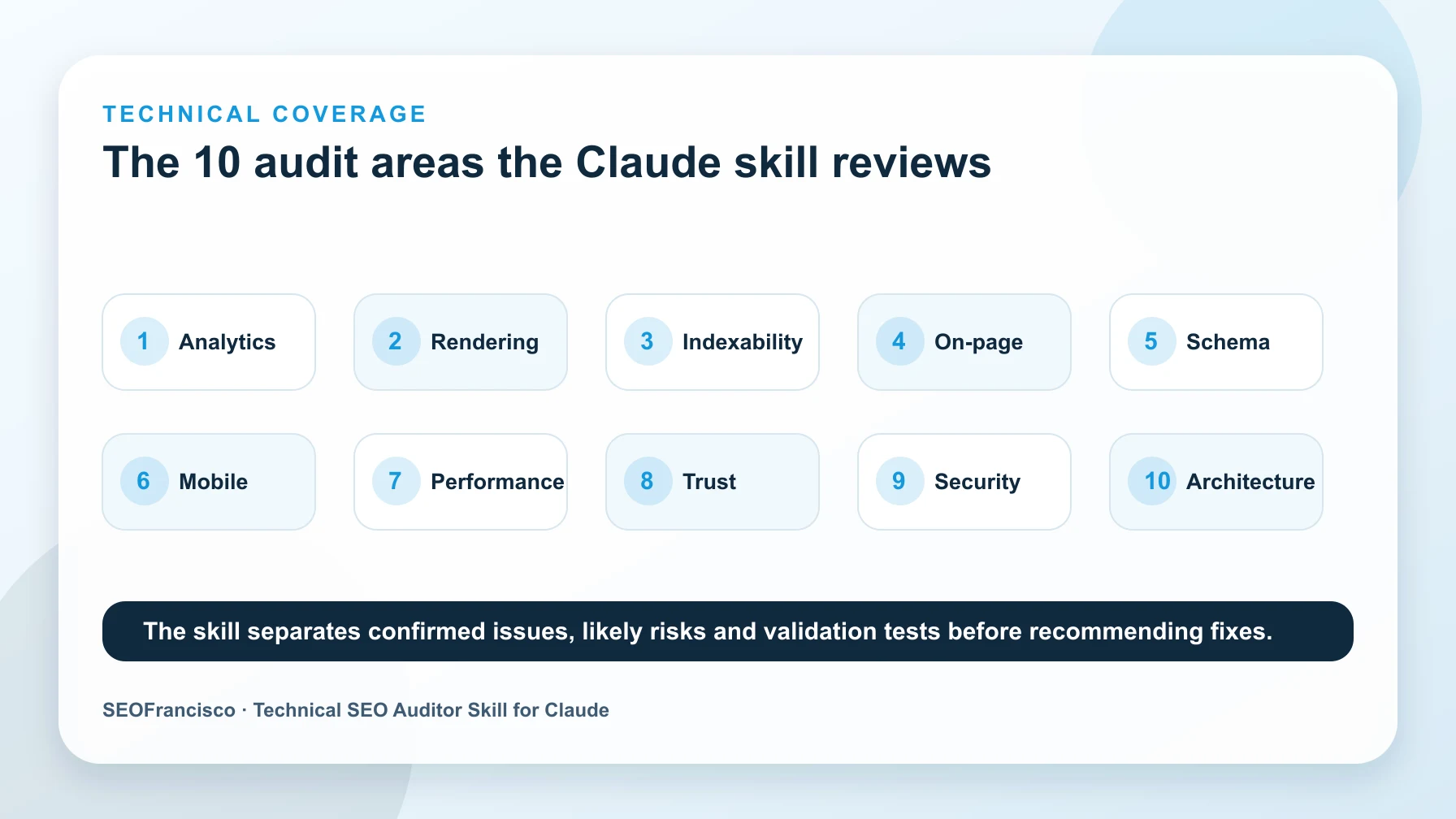
- Analytics and tracking: GA4, GTM, dataLayer events, consent mode, duplicate tags, ecommerce events, and whether SEO landing pages can be measured cleanly.
- Rendering and JavaScript SEO: source HTML versus rendered DOM, SSR/CSR signals, Next.js patterns, hydration issues, missing links, and content hidden until interaction.
- Crawlability and indexability: robots.txt, meta robots, X-Robots-Tag, status codes, blocked resources, canonicals, noindex rules, hreflang, sitemaps, and URL Inspection evidence.
- On-page technical: title tags, meta descriptions, H1/H2 structure, RTL issues, internal links, image attributes, content duplication, and template-level defects.
- Schema markup: NewsArticle, Article, BreadcrumbList, Author, Organization, Product, FAQ, visible-content alignment, entity clarity, and rich result eligibility.
- Mobile and viewport: viewport tags, responsive rendering, tap targets, sticky UI overlap, mobile parity, mobile navigation, and layout stability.
- Performance signals: render-blocking assets, lazy loading, third-party scripts, JavaScript cost, image weight, caching, field data, and lab-only limits.
- Trust and quality: author pages, reviewer signals, editorial transparency, citations, outdated claims, thin pages, affiliate disclosures, and policy pages.
- Security and foundations: HTTPS, mixed content, suspicious scripts, HSTS where relevant, protocol consistency, soft 404s, staging leakage, and server errors.
- International and site architecture: hreflang clusters, canonical-hreflang consistency, subfolders, breadcrumbs, crawl depth, hub pages, and internal PageRank flow.
Those areas connect directly with the work I have been doing on AI citation ranking factors and AI crawler behavior. AI search does not replace technical SEO. It makes technical clarity more visible because crawlers and answer systems need pages they can fetch, parse, trust, and summarize.
What Makes It Consultant-Style
The skill does not ask Claude to "find SEO issues." That prompt is too loose. Instead, it frames the task like a senior audit review.
It asks Claude to:
- Use only the evidence provided unless the user clearly asks for hypotheses.
- Label each finding as confirmed, likely, or needs validation.
- Separate page-level issues from template-level issues.
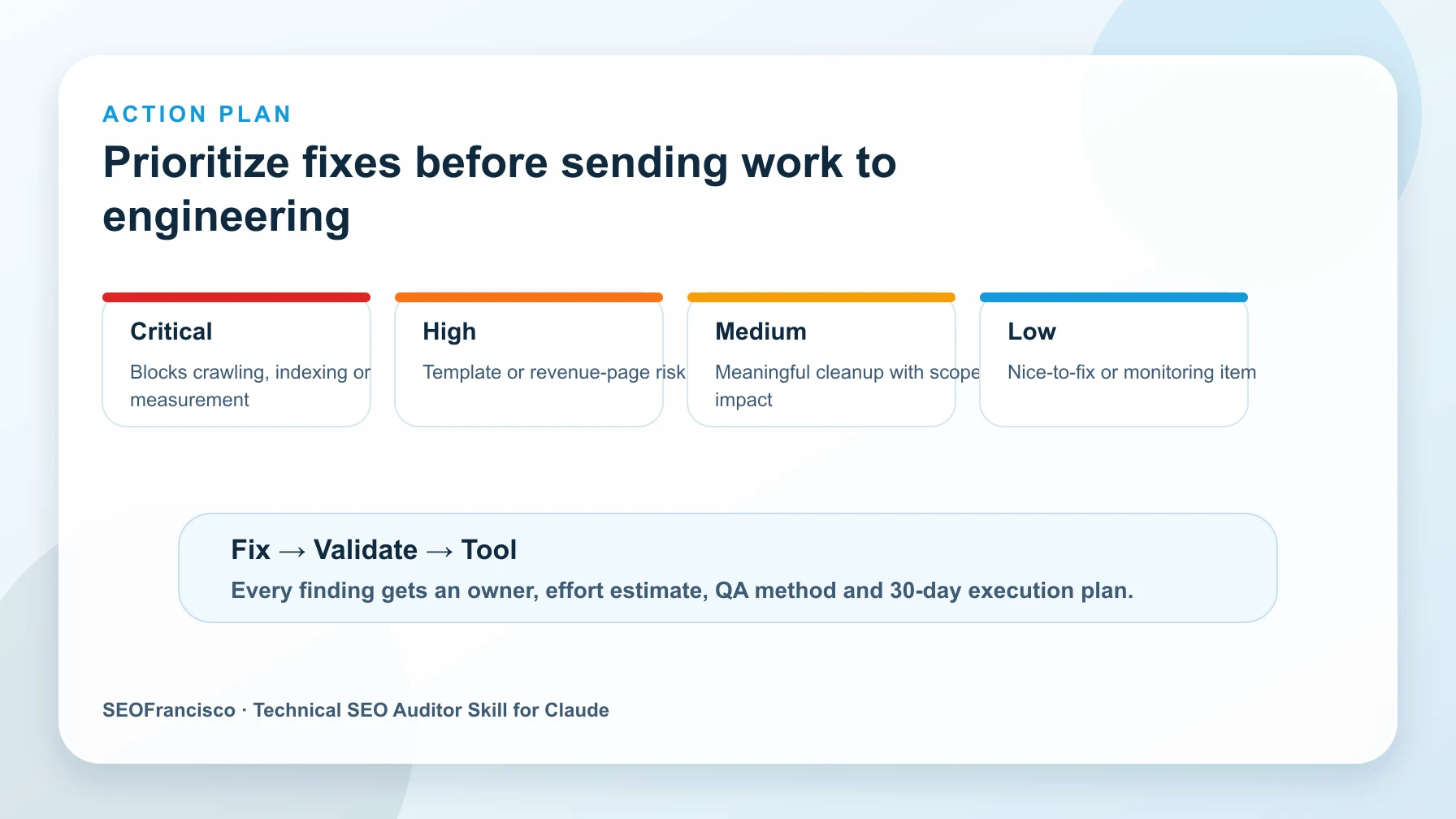
- Prioritize by search impact, not by how easy the issue is to describe.
- Identify the owner, such as SEO, engineering, content, analytics, or product.
- Return the exact next test when the evidence is incomplete.
- Avoid inflated claims when the input does not prove ranking, indexing, or revenue impact.
This matters because Claude is strongest when it receives a defined job, real data, and a strict output contract. I covered that wider workflow in How to Use Claude for SEO Tasks. The Technical SEO Auditor skill applies the same principle to one hard use case: turning messy SEO artifacts into a credible audit.
Example Output Format
The skill pushes Claude toward a format that is easy to review and hard to hide behind.
Finding:
Canonical tag points to a filtered URL on indexable category pages.

Evidence:
- Screaming Frog export shows 312 category URLs with canonical targets containing ?color=.
- Rendered HTML sample confirms the canonical is present in the final DOM.
- GSC shows impressions on the affected category folder, so the template has search exposure.

Impact:
High. Google may consolidate signals into non-preferred parameter URLs and reduce clarity around the primary category pages.

Confidence:
Confirmed.

Recommended fix:
Update the category template so canonical tags point to the clean category URL unless a filtered page is intentionally indexable.

Owner:
Engineering with SEO QA.

Validation:
Re-crawl affected URL samples, inspect rendered HTML, and submit 3 representative URLs through URL Inspection after deployment.
That structure is intentionally plain. It keeps the audit close to the evidence. It also makes it easier to hand work to engineering without sending a 40-page PDF that nobody wants to read.
How To Use It With Real SEO Inputs
The skill works best when you bring real artifacts. Do not ask Claude to audit a site from memory. Give it the same material you would give a consultant.
1. HTML and Rendered HTML
Paste the raw HTML, rendered HTML, or both. For JavaScript-heavy sites, include a note on how the HTML was collected. The skill should compare what is present in source, what appears after rendering, and whether links, content, canonicals, meta robots, and structured data survive the render step.
2. Screaming Frog Exports
Export only the columns needed for the audit question. For example, status code, indexability, canonical link element, inlinks, crawl depth, title, meta description, H1, word count, and structured data validation status. Smaller exports produce better reasoning because Claude can focus on the decision instead of sorting through irrelevant rows.
3. Google Search Console Data
Add page-level clicks, impressions, CTR, position, query groups, indexed pages, crawl stats, and sitemap coverage where relevant. GSC helps the skill distinguish a low-priority defect from a defect on pages Google already sees and users already search for.
4. URL Inspection Evidence
URL Inspection output is useful when the question is indexing, canonical selection, crawling, rendered HTML, or last crawl timing. The skill should treat this as validation evidence, not as a substitute for a crawl. One inspected URL does not prove the whole template is broken. It proves that the sampled URL has a specific Google-observed state.
A Simple Workflow I Recommend
- Pick one audit question, such as "Why are these product pages discovered but not indexed?"
- Export the smallest data set that can answer that question.
- Paste the data into Claude with the Technical SEO Auditor skill active.
- Ask for confirmed findings, likely findings, and tests needed.
- Review the output like a consultant, not like a transcript.
- Turn approved findings into tickets with owners and validation steps.
This is also where AI dashboard work can help. If you are building reporting inside Claude, the same evidence discipline applies. I wrote about that in the Claude AI search dashboard workflow: the tool is only useful when the data source and decision rule are clear.
Where Humans Still Matter
I would not let an AI agent ship technical SEO fixes without human review. The skill is meant to speed up analysis and reduce missed patterns. It is not meant to replace judgment.
Humans still need to decide:
- Whether a page should exist for users, not only whether it can be indexed.
- Whether a canonical rule matches the business model and merchandising logic.
- Whether a noindex rule protects quality or hides revenue pages by accident.
- Whether schema represents visible facts or creates compliance risk.
- Whether a fix is worth engineering time this sprint.
- Whether a recommendation fits migration plans, CMS limits, legal rules, and analytics needs.
That is the line I care about. AI can compress audit work. It can surface patterns faster. It can format findings cleanly. But the final recommendation still needs an SEO who understands the site, the business, and the risk of being wrong.
Download the Skill
You can get the skill file here: Technical SEO Auditor Skill for Claude AI.
If you saw my post and want the setup details, comment Skill and I will send you the downloadable version. If you use it on a real crawl, I would also like to see the before and after. The best test is not whether the audit sounds smart. The best test is whether it helps a team make a better technical SEO decision faster.
FAQ
What is the Technical SEO Auditor skill for Claude?
It is a Claude skill that guides technical SEO audits using real inputs such as HTML, crawl exports, Google Search Console data, and URL Inspection evidence. It returns findings with evidence, impact, confidence, owner, fix, and validation steps.
Can the skill replace Screaming Frog or Google Search Console?
No. It needs those tools. Screaming Frog, GSC, logs, and URL Inspection provide the evidence. The skill helps Claude interpret that evidence and organize it into a prioritized audit.
What data should I paste into Claude before using it?
Start with the smallest data set that answers the audit question. For most cases, use a crawl export, sample URLs, rendered HTML, GSC performance data, indexing evidence, and any notes about templates, migrations, or known CMS behavior.
Is this only for advanced technical SEOs?
No, but it works best when someone can review the output. A founder or marketer can use it to understand risk, while an SEO lead can use it to move faster from raw crawl data to tickets and QA steps.
About the Author