How to Use Claude for SEO Tasks: Research, Briefs, Technical SEO, and Reporting
A practical workflow guide for using Claude across SEO research, keyword clustering, on-page optimization, schema, internal links, competitor analysis, GSC reporting, and AI search readiness.
TL;DR: Claude is most useful for SEO when you stop asking it to "write a blog post" and start giving it structured jobs: classify keywords, compare SERPs, audit HTML, draft schema from visible facts, map internal links, summarize Google Search Console exports, and turn messy SEO data into a prioritized action plan.
This guide shows how to use Claude for:
- Keyword research, intent clustering, and content architecture.
- On-page SEO, content briefs, title tags, meta descriptions, and FAQ blocks.
- Technical SEO triage, schema markup, internal links, and crawl exports.
- Competitor analysis, AI search readiness, reporting, and weekly SEO operations.
The mistake most teams make with Claude is treating it like a magic content machine. That produces generic pages, weak intros, and SEO copy that still needs heavy editing. The better use is operational: give Claude the same inputs an SEO strategist would review, then ask for a constrained output that becomes the next human decision.
That means Claude should see your data. Not vague instructions. Not imaginary keyword volume. Real exports, live SERP notes, HTML, page copy, crawl reports, transcripts, internal URLs, examples, and rules. Anthropic's own prompt engineering docs recommend defining success criteria, using clear instructions, and separating context from the task. Their docs on XML tags are useful because SEO prompts usually mix several inputs: page copy, competitor URLs, constraints, examples, and output format.
Google's SEO Starter Guide gives the other side of the equation. Content still needs to be crawlable, useful, descriptive, internally linked, and built around pages that help users complete a task. Claude can speed up the analysis, but it should not replace live SERP review, factual verification, editorial judgment, or client-specific strategy.
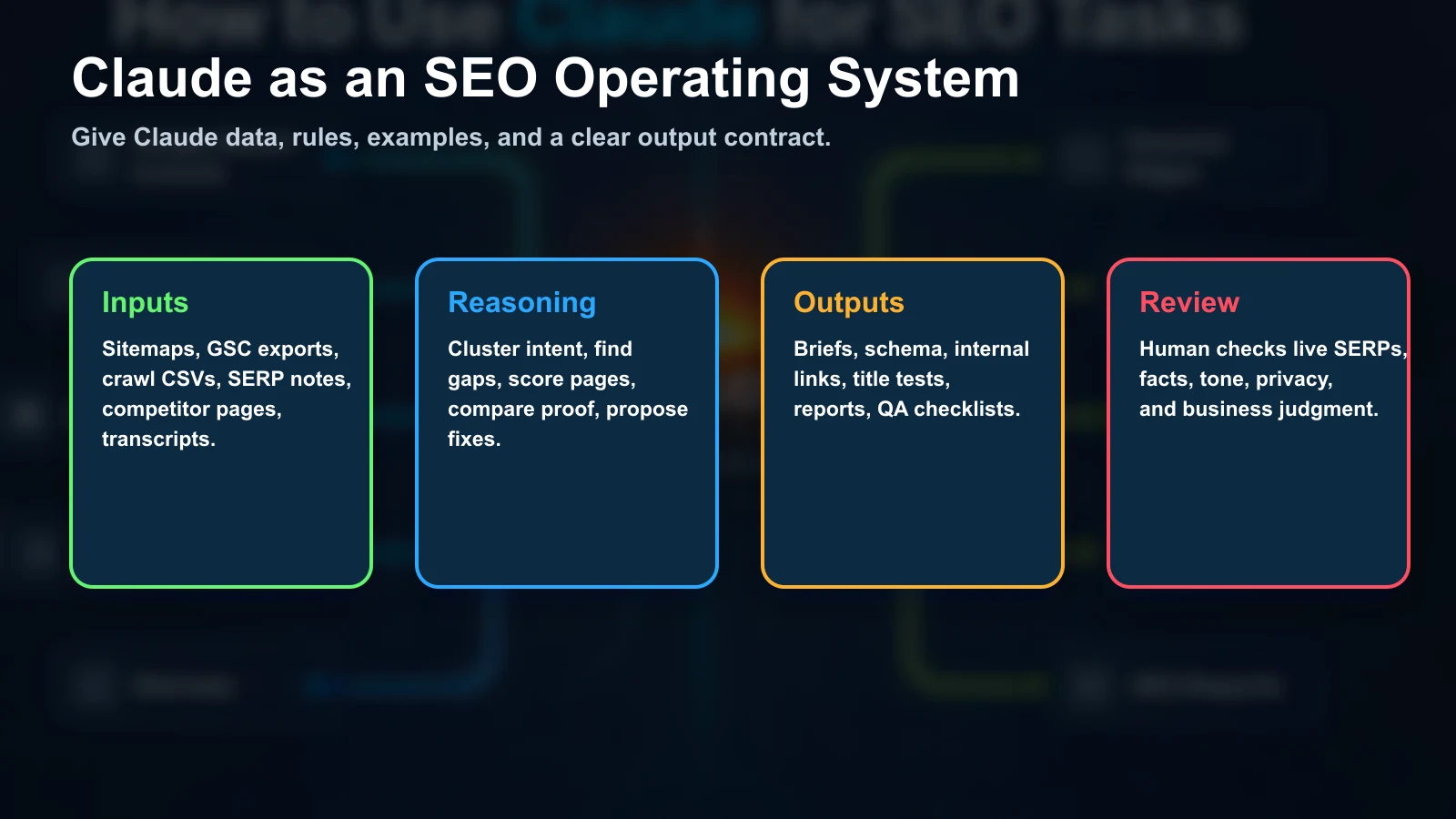
Start With a Claude SEO Project
Before using Claude for SEO work, create a reusable project or working context. This saves you from re-explaining the same brand rules every session and reduces output drift.
Your Claude SEO project should contain:
- Brand description, target markets, service lines, and audience segments.
- Primary competitors, aspirational competitors, and irrelevant competitors to ignore.
- Priority pages, money pages, product pages, service pages, and conversion pages.
- Voice rules, banned phrases, formatting rules, and citation standards.
- Current sitemap, recent GSC export, keyword set, and common internal link targets.
- Examples of content that is approved and examples of content that should be avoided.
The project context is not there to make Claude more verbose. It is there to make the outputs less random. If Claude knows the business model, target pages, tone, and proof standards, it can give you a better brief, a cleaner internal linking plan, and a more useful report.
The Prompt Template That Holds Up
The best SEO prompts are structured like work orders. They tell Claude what role it is playing, what data it should use, what rules it must follow, and what output should be returned.
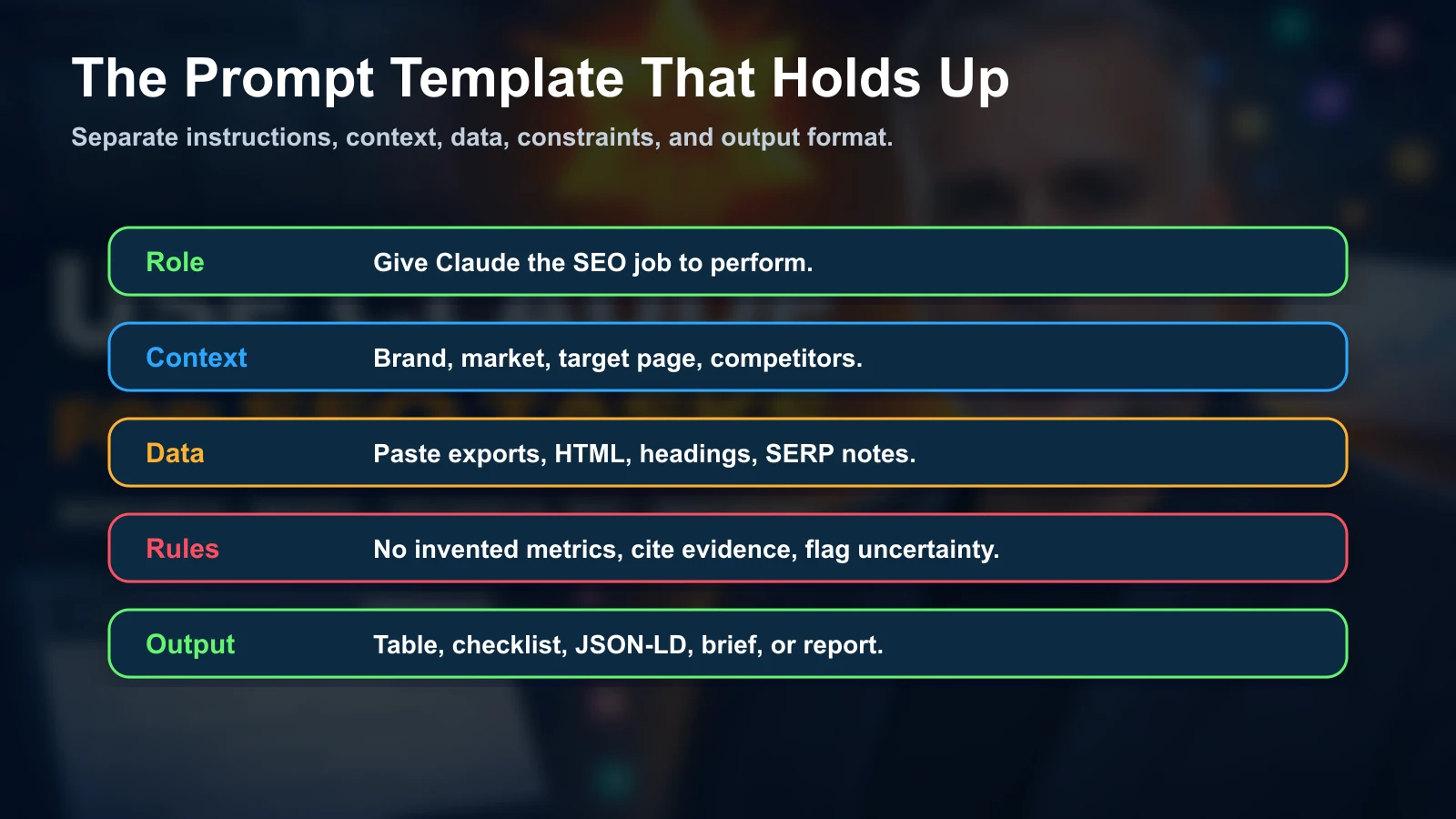
Role:
You are a senior technical SEO strategist.

Context:
The site is [SITE]. The target audience is [AUDIENCE].
The business goal is [GOAL]. Priority pages are [URL LIST].

Data:
Paste the source material below. Use only this data unless asked to suggest a source.

Rules:
- Do not invent search volume, traffic, backlinks, rankings, or conversion data.
- If data is missing, write "data needed" and explain what export would solve it.
- Separate confirmed findings from hypotheses.
- Prioritize fixes by business impact, not by how easy they are to write.

Output:
Return a table with issue, evidence, impact, fix, owner, and priority.
This format works for keyword research, content briefs, schema, internal links, and reporting because it forces Claude to respect the evidence layer. The most important line is the rule against invented metrics. Claude can classify, summarize, and reason from data, but it should not guess numbers that belong in Ahrefs, Google Search Console, Screaming Frog, or another SEO tool.
1. Keyword Research and Clustering
Claude can help with keyword research, but only if the keyword data comes from a real source. Use Ahrefs, Semrush, Google Search Console, DataForSEO, Keyword Planner, or another provider for volume, difficulty, clicks, and SERP data. Then use Claude for classification and architecture.
Use this workflow:
- Export keywords with volume, difficulty, parent topic, current URL, current position, and SERP features.
- Remove columns you do not need so Claude can focus on the decision.
- Ask Claude to classify intent, page type, funnel stage, and existing page match.
- Ask for pillar pages, support pages, FAQ sections, and pages that should not be created.
- Review the live SERP for ambiguous clusters before approving the map.
I am pasting a keyword export with columns:
keyword, volume, difficulty, current_url, current_position, serp_features.

Cluster the keywords by search intent and recommended page type.

For each cluster, return:
- cluster name
- primary keyword
- supporting keywords
- search intent
- recommended page type
- current matching URL, if one exists
- content gap
- priority

Do not invent missing volume or ranking data.
The useful output is not a list of more keywords. It is a decision map: which page should exist, which page should be updated, which keywords belong together, and which terms should be ignored because they do not match the business.
2. Content Briefs That Writers Can Actually Use
A content brief from Claude should not be a generic outline. It should act like a contract between SEO strategy, editorial work, and the business goal.
Give Claude:
- The target keyword cluster.
- Three to five competing URLs or SERP notes.
- The target audience and conversion goal.
- Internal links that must be considered.
- Sources that should be cited.
- Claims that require proof.
Create an SEO content brief for this keyword cluster:
[PASTE CLUSTER]

Use these SERP notes:
[PASTE NOTES]

The page goal is:
[GOAL]

Return:
1. Search intent summary.
2. Recommended angle.
3. H1.
4. H2/H3 structure.
5. Questions to answer.
6. Proof required.
7. Internal link targets.
8. Suggested schema.
9. What not to include.
10. Editorial checklist before publishing.
The "what not to include" section matters. Claude can overbuild content if you let it. A good brief should say which topics belong elsewhere, which claims need more evidence, and which tangents would dilute the page.
3. On-Page SEO: Titles, Metas, Intros, and Entity Gaps
Claude is strong at on-page comparison work because it can hold your draft, competitor snippets, target keyword, and brand constraints at the same time.
Use it for:
- Title tag variants under a specific pixel or character target.
- Meta descriptions with a clear reason to click.
- Opening paragraphs that answer the searcher quickly.
- Heading audits.
- Entity and subtopic gaps.
- FAQ candidates based on real questions.
Audit this page draft for on-page SEO:
[PASTE DRAFT]

Target query:
[QUERY]

Competitor angle notes:
[PASTE SERP NOTES]

Return:
- title tag issues
- meta description issues
- H1/H2/H3 issues
- missing entities or subtopics
- sections that answer too slowly
- sections that sound generic
- recommended rewrite blocks
Do not ask Claude for the final title once. Ask for variants by angle: direct benefit, risk avoidance, comparison, local intent, enterprise intent, and AI search intent. Then review those variants against the live SERP.
4. Technical SEO and Schema
Claude can help triage technical SEO exports when the task is scoped. Do not paste a massive crawl and ask "what is wrong?" Instead, export the columns tied to a specific problem.
For example:
- Status code, indexability, canonical, title, meta description, H1, word count.
- URL, depth, inlinks, outlinks, response time, template type.
- URL, schema types found, schema errors, page type, conversion value.
I am pasting a technical SEO crawl export.

Find issues that are likely to affect organic visibility or crawling.
Group them into:
- critical
- important
- monitor
- ignore

For each issue, include:
- evidence from the CSV
- affected URL count
- sample URLs
- likely cause
- recommended fix
- whether a developer is needed
For schema, Claude should draft JSON-LD from visible page facts only. If the page does not visibly support a claim, the schema should not invent it.
Generate JSON-LD for this page:
[PASTE PAGE COPY OR HTML]

Rules:
- Use only facts visible in the page content.
- Do not invent ratings, prices, awards, or service areas.
- If a field is missing, omit it.
- Return valid JSON-LD only, then explain what page copy would improve the markup.
This keeps schema aligned with the page, which matters for both search quality and trust.
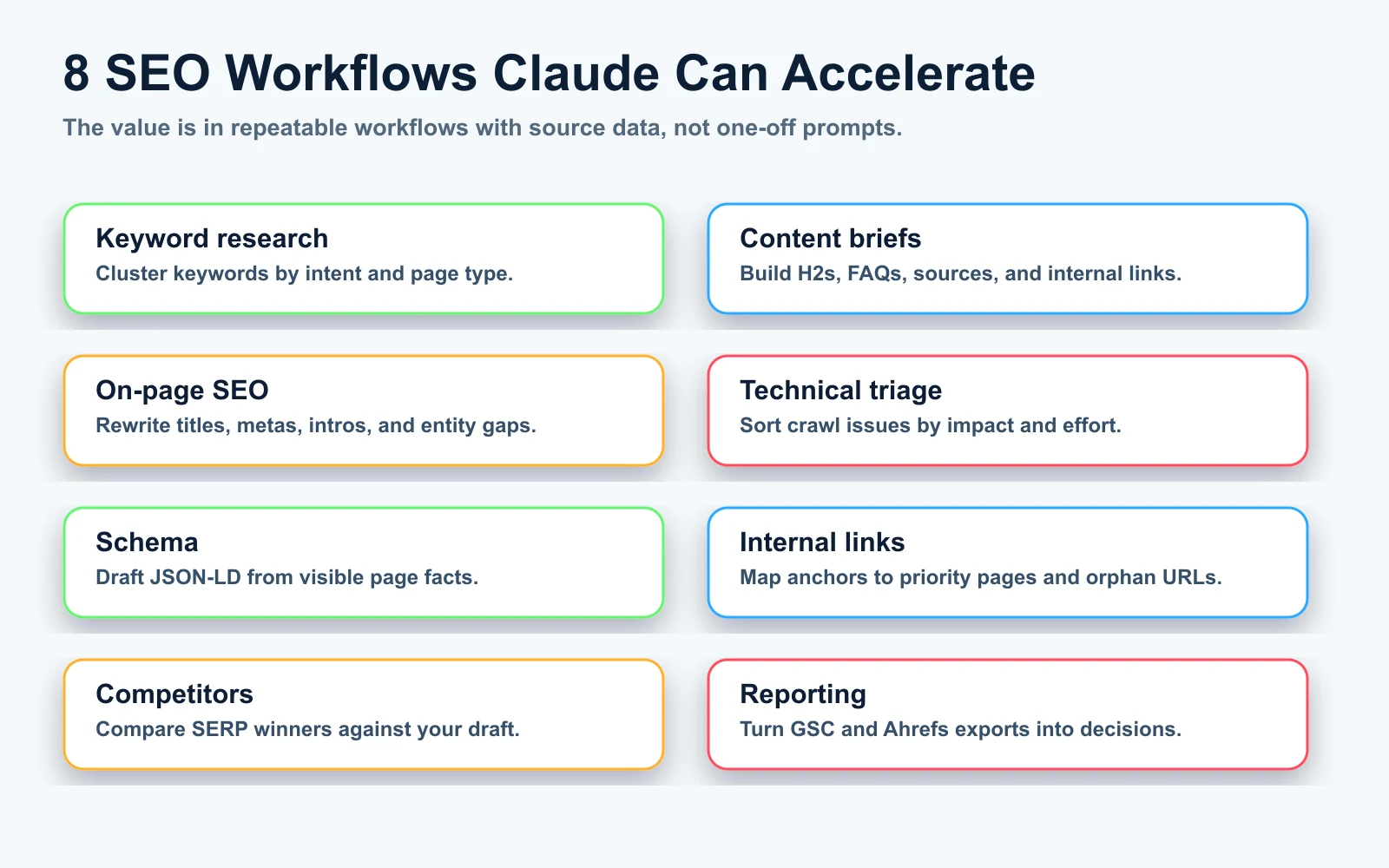
5. Internal Linking
Internal linking is one of the best practical uses for Claude because it combines text understanding, site architecture, and anchor selection. The key is to give Claude your real URL inventory and priority rules.
Use a three-part input:
- A list of internal URLs with title, topic, page type, and priority.
- The draft or existing article.
- Rules for anchor text, link count, and pages that should receive more equity.
Use this internal URL inventory:
[PASTE URL LIST]

Use this article draft:
[PASTE ARTICLE]

Recommend internal links.

Rules:
- Add 5 to 8 links.
- Prefer priority pages when relevant.
- Use natural anchor text from the sentence.
- Do not force links where the context is weak.
- Return the sentence, anchor text, target URL, and reason.
This is safer than asking for links from memory. Claude may know your site badly if you do not provide the URL inventory. With the inventory, it can build links that match the site's actual architecture.
6. Competitor and SERP Analysis
Claude can compare competitor pages quickly, but it still needs the source material. For a serious SEO analysis, collect the live SERP first. Use incognito or a clean browser profile when location and personalization matter. Save screenshots of the actual result page. Then extract the text and structure of the top results.
Use this prompt:
Compare my draft against the top 3 ranking pages.

Target query:
[QUERY]

My draft:
[PASTE DRAFT]

Competitor notes:
[PASTE TOP 3 NOTES OR PAGE TEXT]

Analyze:
- search intent match
- heading structure
- information gain
- original proof
- author trust
- examples and screenshots
- internal links
- schema opportunities
- conversion path

Return a prioritized rewrite plan.
The output should not simply say "write more." Ask Claude to find the specific missing proof, section, example, comparison, table, image, or source that would make the page more useful than the current winners.
7. AI Search and LLM Readiness
Claude can also help prepare pages for AI search. That does not mean stuffing hidden instructions into HTML. Google has already described public-web prompt injection as an abuse pattern. The better move is to make your page easier to verify and summarize.
Ask Claude to audit the page for:
- Direct answer blocks near the top of sections.
- Clear definitions and comparison tables.
- Original examples, screenshots, quotes, and data.
- Source citations for claims that need support.
- Consistent entity naming across page, schema, author bio, and footer.
- FAQ answers that match real buyer questions.
- Places where generic AI phrasing should be replaced with observed facts.
Audit this page for AI search readiness:
[PASTE PAGE]

Return:
- questions this page can answer
- questions it almost answers
- claims that need proof
- sections that need a clearer direct answer
- sources that should be cited
- schema opportunities
- internal links that would strengthen context
- phrases that sound generic and should be rewritten
This connects to the same idea in the Claude prompts for LLM ranking guide: ranking in AI answers depends on evidence, not prompt tricks.
8. Reporting With GSC and Ahrefs Exports
Claude can turn exports into a readable SEO report. The value is not the writing. The value is sorting the data into decisions.
For Google Search Console, export:
- Query, page, clicks, impressions, CTR, position.
- Compare last 28 days against previous period.
- Separate branded and non-branded queries when possible.
For Ahrefs, export:
- Top pages, organic keywords, referring domains, lost backlinks, competing domains.
- Keyword opportunities where competitors rank and you do not.
- Pages with declining keyword count or lost traffic share.
Analyze this SEO performance export.

Return:
1. Biggest wins.
2. Biggest losses.
3. Pages with high impressions and low CTR.
4. Queries ranking 8 to 25 with realistic upside.
5. Pages that need content updates.
6. Pages that need internal links.
7. Issues that need more data before action.
8. A 10-item action plan for next week.

Do not invent revenue impact. If revenue is not included, say that revenue data is needed.
This is how Claude becomes useful for monthly reporting. The report should tell the team what to do next, not merely describe whether traffic went up or down.
Common Mistakes When Using Claude for SEO
Using Claude Without Real Data
If you ask Claude for search volume, keyword difficulty, backlink counts, or rankings without giving it a data source, you are asking it to guess. Use exports or connected tools. Then ask Claude to classify, prioritize, and explain.
Skipping Live SERP Review
Claude can analyze pasted competitor pages, but it does not replace checking the current SERP. Local packs, AI Overviews, videos, forums, shopping modules, and ads change the shape of the opportunity.
Letting Claude Publish Without Human QA
Every Claude-assisted SEO workflow needs review for facts, privacy, legal risk, client claims, tone, and business fit. This is even more important in legal, medical, financial, and local service content.
Asking for Strategy When You Need a Work Order
"Give me an SEO strategy" creates vague output. "Analyze this GSC export and return five title tests for pages with high impressions and low CTR" creates something the team can use.
The Best Claude SEO Workflows to Start With
If you are starting from scratch, do not try to automate the whole SEO program in one session. Start with four workflows that produce clear wins:
- GSC quick-win report: high impressions, low CTR, positions 8 to 25, title/meta tests.
- Content brief generator: target query, SERP notes, proof required, internal links, FAQ, schema.
- Internal link map: URL inventory plus draft article, with anchor text and target URLs.
- Schema draft and QA: JSON-LD based only on facts visible on the page.
Once those are reliable, add competitor gap analysis, crawl triage, AI search readiness checks, and weekly reporting. That sequence keeps the process grounded in data and gives the team outputs they can inspect.
My Recommended Weekly Setup
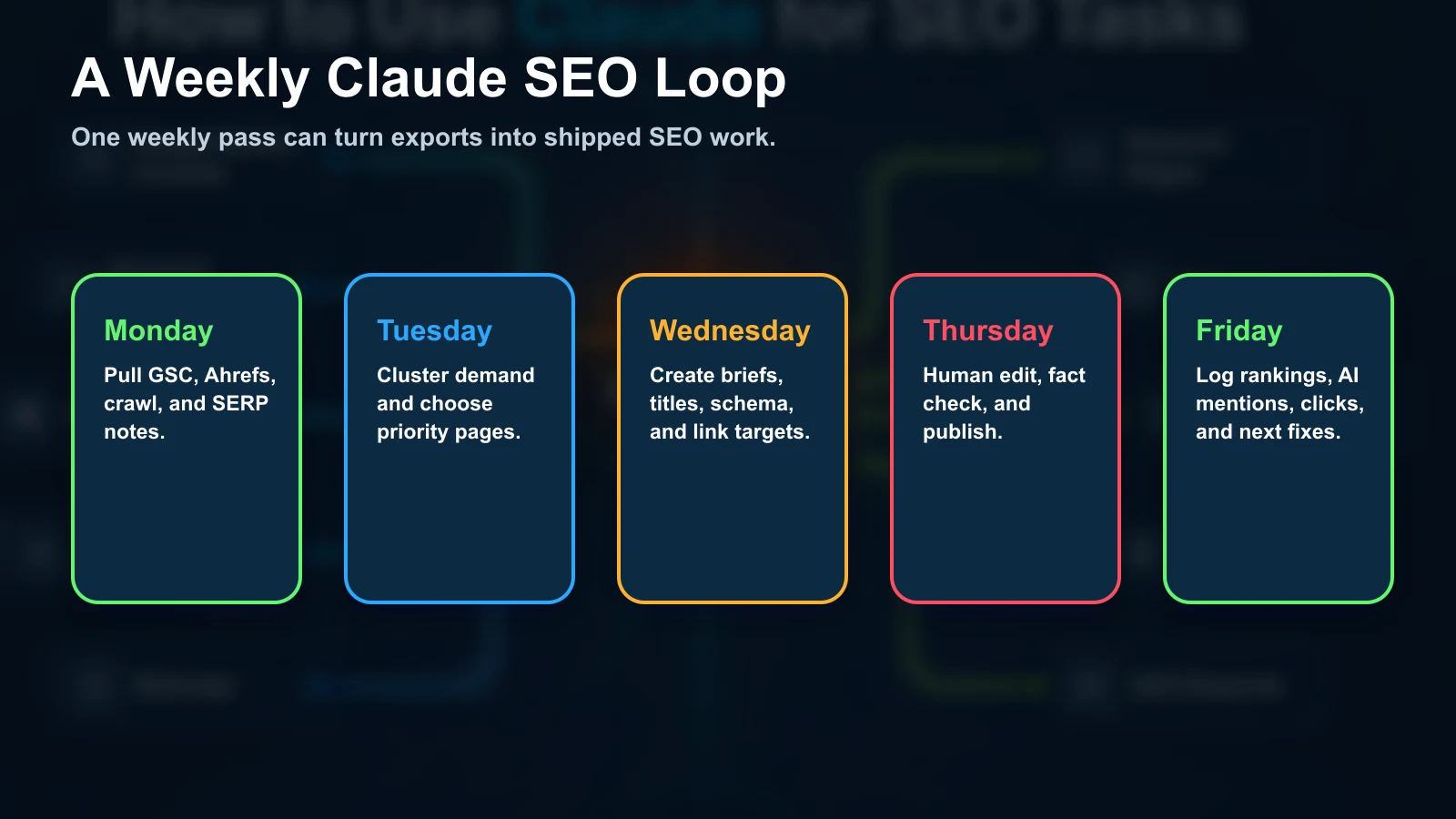
Here is the weekly rhythm I would use for a lean SEO team:
- Monday: Export GSC, Ahrefs, crawl data, and priority keyword movements.
- Tuesday: Use Claude to cluster opportunities and choose pages to update.
- Wednesday: Generate briefs, title tests, FAQ blocks, schema drafts, and link maps.
- Thursday: Human edit, verify facts, add screenshots or examples, and publish.
- Friday: Log ranking changes, AI answer mentions, click changes, and next actions.
That cadence gives Claude a narrow job each day. It also keeps the human in control of strategy, facts, and publication quality.
Sources
- Anthropic Claude Docs: Prompt engineering overview
- Anthropic Claude Docs: Use XML tags
- Anthropic Claude Code Docs: Connect Claude Code to tools via MCP
- Anthropic Support: Using web search on Claude.ai
- Google Search Central: SEO Starter Guide
About the Author